
Over 1,130 ransomware attacks strike organizations globally each week, a 20% increase from 2024 according to a 2026 forecast by Check Point Research. This guide details the full ransomware attack chain, identifies crucial warning signs and Indicators of Compromise (IOCs), outlines a precise incident response playbook, and reinforces the preventive controls essential for stopping these threats before they escalate. You'll get actionable steps, specific event IDs, and real-world lessons from incidents like Change Healthcare in 2024.
How Ransomware Works: The Attack Chain
Ransomware is a multi-stage operation. Attackers meticulously map out entry points, disable alarms, collect blueprints, and then execute their plan, often exfiltrating data before demanding a ransom.
1. Initial Access
Attackers first gain a foothold, often through Exploitation of Public-Facing Application (T1190), like unpatched vulnerabilities in Fortinet VPNs or Microsoft Exchange servers. Phishing (T1566) remains a top vector, tricking users into executing malware, or they might compromise Valid Accounts (T1078) via stolen RDP or VPN credentials.
2. Execution & Persistence
Once inside, malware executes using Command and Scripting Interpreter (T1059), often PowerShell or cmd.exe. They establish Persistence (T1547), ensuring their access survives reboots, frequently by modifying registry keys for Boot or Logon Autostart Execution, or creating Scheduled Tasks/Jobs (T1053).
3. Privilege Escalation & Defense Evasion
Threat actors escalate privileges using Exploitation for Privilege Escalation (T1068), leveraging known flaws like PrintNightmare (CVE-2021-34527), or through Process Injection (T1055). They actively engage in Defense Evasion (T1070), deleting shadow copies with vssadmin.exe delete shadows and using Impair Defenses (T1562) to disable antivirus or EDR solutions.
4. Credential Access & Discovery
Next, they collect credentials via OS Credential Dumping (T1003) with tools like Mimikatz or by finding Unsecured Credentials (T1552) in configuration files. They then perform Discovery (T1087), mapping the network using Remote System Discovery (T1018) and File and Directory Discovery (T1083) to locate high-value data.
5. Lateral Movement & Collection
Attackers move across the network using Remote Services (T1021) such as RDP or SMB, often transferring tools with Lateral Tool Transfer (T1570) and utilities like PsExec. They then engage in Collection (T1074), staging data into archives, often password-protected, via Archive Collected Data (T1560).
6. Exfiltration & Impact
Before the final encryption, data exfiltration occurs, typically Exfiltration Over C2 Channel (T1041) via HTTPS POSTs to cloud storage or Exfiltration Over Alternative Protocol (T1048) using FTP/SFTP. Finally, the Impact (T1486) hits: data is encrypted, systems are rendered inoperable, Inhibit System Recovery (T1490) deletes backups, and Service Stop (T1489) halts critical processes.
Ransomware Variants and Types
Ransomware tactics and impact continue to change. Understanding these distinctions helps you prepare targeted defenses.
Standard File Encryption Ransomware
This classic variant encrypts local and network files, demanding a ransom for the decryption key. Its primary goal is data unavailability. Early strains like WannaCry caused global disruption in 2017, and later with Ryuk.
Double Extortion Ransomware
The dominant model today, this type not only encrypts files but also exfiltrates sensitive data, threatening public release if the ransom isn't paid. Groups like LockBit and BlackCat (ALPHV) famously use this strategy, increasing pressure on victims.
Disk Encryption Ransomware (Wiper-like)
These variants encrypt entire disk partitions or the Master Boot Record (MBR), rendering the system completely unusable rather than just individual files. NotPetya in 2017 and LockerGoga are prime examples, often masquerading as ransomware but designed for destructive impact.
Ransomware-as-a-Service (RaaS)
RaaS groups democratize cybercrime, with developers creating the ransomware code and infrastructure, then recruiting affiliates to deploy it. The developers take a cut of the profits. Prominent RaaS operations include Conti and DarkSide (later known as BlackMatter), which was behind the Colonial Pipeline attack in 2021.
How to Detect Ransomware: Warning Signs and IOCs
Detecting ransomware early means recognizing deviations from normal behavior, not just known signatures. You are looking for an orchestra of bad actions.
Endpoint Indicators
Keep an eye on Windows Event IDs and EDR alerts. A surge in Event ID 4663 (file modification/creation with unusual extensions like .locked, .enc, or custom ransomware extensions) is a red flag. Look for Event ID 4688 indicating suspicious processes, especially vssadmin.exe delete shadows or the execution of dual-use tools (PsExec, Mimikatz, PowerShell). Successful brute-force attempts followed by unusual successful logins (Event ID 4624) also signal compromise. Your EDR, such as CrowdStrike Falcon or SentinelOne, should be generating alerts like 'Ransomware Activity Detected: High Volume File Encryption', 'Shadow Copy Deletion Attempt', 'Suspicious PowerShell Execution', or 'Process Injection'.
Network Indicators
Ransomware campaigns often create unusual network traffic. Monitor for outbound connections to uncommon C2 ports (e.g., TCP 4444, 8080, or ports outside typical HTTP/S). Look for connections to known C2 domains or IP addresses, anomalous DNS queries for newly registered domains, or traffic to Tor exit nodes. Sudden spikes in outbound encrypted traffic often indicate data exfiltration (T1041, T1048). Additionally, watch for internal lateral movement attempts using SMB enumeration or RDP/WMI scans between otherwise unrelated hosts.
SIEM Detection
Your SIEM needs rules built to correlate these signals. A simple Splunk query to detect shadow copy deletion could be: EventID=4688 Image="*vssadmin.exe*" CommandLine="*delete shadows*" | stats count by ComputerName, CommandLine. Similarly, a rule for rapid file modification might aggregate Event ID 4663 events on file shares, alerting when a single user or process creates or modifies hundreds of files with new, non-standard extensions within a short timeframe (e.g., 5 minutes). Correlate firewall logs for anomalous outbound connections to non-business-critical ports or unusual geo-locations, especially when paired with endpoint alerts for suspicious processes.
Response Playbook: What to Do When Ransomware Hits
When ransomware strikes, every second counts. You need a pre-defined, tested playbook, not a scramble.
Phase 1: Immediate Containment (first 15 minutes)
As soon as you suspect ransomware, act fast. Physically isolate affected systems by disconnecting network cables or disabling Wi-Fi/network adapters. For virtual machines, suspend network access immediately. Use your EDR platform to quarantine the patient zero endpoint and block known malicious processes. Disable remote access methods like VPNs and RDP gateways until you confirm they're clean, and force password resets for any potentially compromised user accounts, especially privileged ones.
Phase 2: Forensic Preservation
Before you clean up, preserve crucial evidence. This is where most teams fail. Create full disk images of critical affected systems using tools like FTK Imager or Autopsy and capture memory dumps (dumpit.exe or winpmem) before shutting down or rebooting. Volatile memory contains cryptographic keys, attacker tools, and process information that disappears on shutdown, making it essential for forensic analysis and potential decryption. Securely collect all available logs: Windows Event logs, firewall, EDR, SIEM, and VPN logs. Perform network captures on affected segments if possible. This data is your truth, your learning material, and potentially your path to recovery.
Phase 3: Recovery and Hardening
First, eradicate the ransomware and any lingering threat actor presence. This means wiping and rebuilding systems from known-good images. Validate system security, ensuring all vulnerabilities (CVE-2021-34527 for example) are patched and all malicious backdoors are gone. Prioritize restoring critical business functions from clean, verified, immutable, and air-gapped backups. Conduct a thorough post-incident review for lessons learned, identifying root causes and enhancing controls. Maintain transparent communication with internal stakeholders, CISA (within 72 hours for incidents, 24 hours for ransom payments if critical infrastructure as per CIRCIA), and regulatory bodies like HIPAA or GDPR, often with 24-72 hour deadlines.
How to Prevent Ransomware: Controls That Work
Effective ransomware prevention relies on a layered defense, not a silver bullet. You need robust, continuously monitored controls.
Data Backups & Recovery
Implement immutable, air-gapped, and frequently tested backups (NIST SP 800-53 CP-9, CP-10). Ensure these backups are stored offsite and are logically and physically separate from your production network. Tools like Veeam or Acronis offer critical features for secure, verifiable backups, making sure you can actually restore when needed. Regularly test your recovery processes to minimize downtime during a real incident.
Vulnerability & Patch Management
Maintain a rigorous vulnerability management program (NIST SP 800-53 RA-5). Regularly scan your environment, prioritizing and promptly patching operating systems, browsers, and critical applications. Focus on publicly facing applications, as exploited vulnerabilities like those in Fortinet or Microsoft Exchange are frequent initial access points (T1190). Remediate flaws identified by continuous monitoring (NIST SP 800-53 SI-2).
Endpoint & Network Security
Deploy EDR/NGAV solutions like CrowdStrike Falcon on all endpoints, configured to block suspicious behaviors (NIST SP 800-53 SI-3). Implement robust network segmentation (NIST SP 800-53 SC-7), isolating critical servers and sensitive data enclaves. Use Zero Trust principles, ensuring strict boundary protection and monitoring for lateral movement (T1021.001, T1570). Implement strong email security with DMARC/SPF/DKIM and attachment sandboxing to prevent phishing (T1566.001).
Identity & Access Management
Enforce Multi-Factor Authentication (MFA) on all critical systems, especially RDP, VPNs (NIST SP 800-53 IA-2), and privileged accounts. Adhere strictly to the principle of Least Privilege (NIST SP 800-53 AC-6), granting users only the access they need. Implement strong, unique passwords (NIST SP 800-53 IA-5) and closely monitor account management (NIST SP 800-53 AC-2), especially for new accounts or privilege changes (T1098). Disable unnecessary services and ports (NIST SP 800-53 CM-7).
Monitoring & Training
Centralize logs into a SIEM for continuous monitoring and audit record review (NIST SP 800-53 AU-6). Implement security awareness training (MITRE ATT&CK T1566.002) regularly, educating users on phishing, safe browsing, and reporting suspicious activity. This helps mitigate risks associated with user execution (T1204.002). Maintain up-to-date configuration settings (NIST SP 800-53 CM-6) and ensure consistent event logging (NIST SP 800-53 AU-2).
Real-World Incidents
Learning from past attacks provides invaluable intelligence for future defense. These incidents illustrate the devastating impact and common weaknesses.
Change Healthcare (2024)
In February 2024, the BlackCat (ALPHV) ransomware group crippled Change Healthcare, a subsidiary of UnitedHealth Group, which processes prescriptions and payments across the US healthcare system. The attack caused weeks of widespread disruption, impacting pharmacies, hospitals, and patients. UnitedHealth Group confirmed it paid a ransom of approximately $22 million in Bitcoin. The company projects the total financial impact to exceed $1 billion, and over 100 million patient records were potentially exposed, though UnitedHealth Group has not confirmed the exact number. CISA identified the root cause as a compromised Citrix endpoint, likely via a vulnerability. The average recovery period for affected organizations was around 150 days.
Lesson: Unpatched public-facing applications are prime targets, and supply chain attacks can have massive ripple effects.
ION Group (2023)
In January 2023, the LockBit ransomware group struck ION Group, a major provider of financial trading software. This attack severely impacted over 40 banks and financial institutions, causing multi-day delays in global derivatives trading and settlement processes. While ION Group did not publicly confirm the exact ransom paid, reports indicated a significant payment was made. The incident highlighted the fragility of interconnected financial systems. The root cause was suspected to be a vulnerable internet-facing service or successful phishing campaign targeting ION employees. BleepingComputer reported on the incident.
Lesson: Critical infrastructure providers, even in the financial sector, need robust external attack surface management and incident response plans for systemic events.
Optus (2022)
Australia's second-largest telecommunications company, Optus, suffered a major data breach in September 2022. While not a traditional ransomware encryption event, the incident involved attackers compromising and threatening to sell personal data for up to 9.8 million customers, including names, dates of birth, phone numbers, email addresses, and identification document numbers like passport and driver's license details. Optus estimated the cost for recovery and remediation to be over $140 million (AUD). The Privacy Regulator filed civil penalty proceedings, alleging failures in protecting customer data. The root cause was identified as an unsecured API endpoint allowing unauthenticated access to customer data. KrebsOnSecurity covered the incident.
Lesson: Data exfiltration and the threat of publication are powerful extortion tactics even without encryption, emphasizing the need for API security and strong access controls (NIST SP 800-53 AC-3).
Data at a Glance
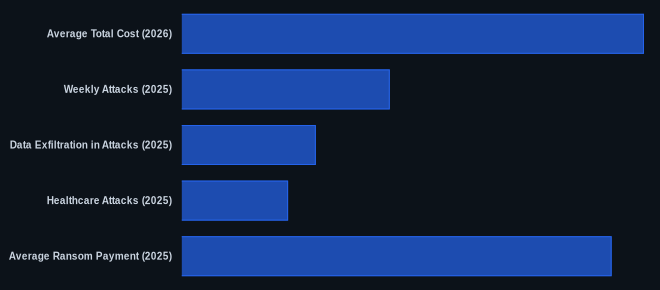
| Metric | Value | Source |
|---|---|---|
| Average Total Cost (2026) | $5.6 million | Sophos, Coveware (Projected) |
| Weekly Attacks (2025) | 1,130 per organization | Check Point Research (2026 Forecast) |
| Data Exfiltration in Attacks (2025) | 85% of attacks | Mandiant (2026 Cyber Defense Report) |
| Healthcare Attacks (2025) | 35% increase YoY | IBM Security X-Force (2026 Threat Intelligence Report) |
| Average Ransom Payment (2025) | $1.85 million | Sophos, Coveware |
The CVEDaily Take
We consistently see that the critical gap in most organizations isn't necessarily a lack of tools, but a failure to rigorously test their forensic readiness. Capturing volatile memory and full disk images before systems go offline is a non-negotiable step that's often overlooked, but it's your best chance at understanding the full scope of an attack and potentially recovering critical data. Are your teams truly prepared to execute a memory dump on a live, compromised system at 3 AM?
FAQ
Q: How to detect ransomware?
A: Focus on high-volume file modifications (Windows Event ID 4663) with unusual extensions, attempts to delete shadow copies (vssadmin.exe delete shadows detected by Event ID 4688), and anomalous outbound network connections to uncommon ports or known C2 infrastructure.
Q: How to respond to a ransomware attack?
A: Immediately isolate affected systems from the network, quarantine patient zero via EDR, and force password resets for any potentially compromised accounts, especially privileged ones. Prioritize these containment steps in the first 15 minutes.
Q: How to prevent ransomware?
A: Implement robust, immutable, and air-gapped data backups with tested recovery processes. Additionally, deploy strong endpoint detection and response (EDR) solutions across all systems and maintain a rigorous vulnerability and patch management program to close initial access vectors.
