
Detecting ransomware before encryption begins is your best defense. The Change Healthcare attack in 2024 illustrated how a single breach can cripple national infrastructure, with UnitedHealth Group reporting over $1 billion in costs for Q1 2024. This guide delivers actionable detection signals, a concrete response playbook, and effective prevention controls for IT teams and security engineers. We'll show you how to identify ransomware’s subtle warning signs, use SIEM correlation rules, and rebuild your defenses.
How Ransomware Works: The Attack Chain
Ransomware isn't a single event; it's a multi-stage attack that unfolds over hours, days, or even weeks. Attackers scout an environment, disable alarms, find the safe, clear out valuables, and then set the building on fire to destroy evidence. Understanding each phase lets you disrupt them before they achieve their primary objective.
1. Initial Access (TA0001)
Attackers gain entry, often through phishing campaigns (T1566.001) delivering malicious links or attachments. Exploiting public-facing applications (T1190), such as an unpatched Citrix NetScaler vulnerability like CVE-2023-46805 in the Change Healthcare incident, also offers a quick way in. Sometimes, they use valid accounts (T1078) obtained via brute-forcing or compromised credentials.
2. Execution (TA0002)
Once inside, attackers run their malicious code. This could be user execution (T1204) if an employee clicks a macro-enabled document, or through a command and scripting interpreter (T1059) using PowerShell or CMD to download further payloads. They might also establish persistence by creating a scheduled task (T1053.005).
3. Persistence (TA0003) & Privilege Escalation (TA0004)
Adversaries want to ensure they can return and elevate their permissions. They'll modify registry run keys (T1547.001) for persistence, or exploit a vulnerability for privilege escalation (T1068), potentially bypassing User Account Control (UAC) (T1548.002) to gain administrative rights.
4. Defense Evasion (TA0005)
Before the main event, attackers disarm security. They'll deactivate security software (T1562.001), hide their tools with obfuscated files (T1027), and delete logs or shadow copies (T1070.004) to hinder forensic analysis.
5. Credential Access (TA0006)
With higher privileges, they hunt for credentials. OS credential dumping (T1003) using tools like Mimikatz is common, alongside brute force attacks (T1110.001) against local accounts or domain services.
6. Discovery (TA0007) & Lateral Movement (TA0008)
Attackers map the network, identifying valuable targets. They'll use network share discovery (T1135) and system network configuration discovery (T1016). Then, they move laterally using remote services (T1021) like RDP or SMB, or tools like PsExec (T1570), as seen in the City of Oakland attack in 2023.
7. Collection (TA0009) & Exfiltration (TA0010)
Data is gathered from local systems (T1005), often archived (T1560) into password-protected ZIP or RAR files. For double extortion, this data is exfiltrated over web service protocols (T1041) to attacker-controlled cloud storage or servers.
8. Impact (TA0040)
This is the final stage. Attackers encrypt data for impact (T1486), rendering it inaccessible. They might also wipe disks (T1485) or inhibit system recovery (T1490) by deleting backups and shadow copies, making recovery harder and increasing pressure to pay.
Ransomware Variants and Types
Ransomware isn't monolithic; its variants reflect evolving criminal business models and objectives. Understanding these distinctions helps predict attacker motives and potential outcomes, from data recovery challenges to reputation damage.
Locker Ransomware
This traditional variant encrypts files on a victim's system and demands a payment, usually in cryptocurrency, for the decryption key. Its primary goal is financial gain through data denial. Ryuk and LockBit are prime examples, known for their rapid encryption capabilities and widespread impact.
Leakware/Double Extortion Ransomware
Beyond encryption, this type exfiltrates sensitive data before encrypting it. Attackers then threaten to publish the stolen data if the ransom isn't paid, adding reputational damage and regulatory fines (like GDPR) to the victim's woes. BlackCat (ALPHV), responsible for the Change Healthcare attack, and Cl0p frequently employ this tactic, with over 80% of incidents now involving double extortion as of 2026, as reported by Palo Alto Networks Unit 42.
Wiper Ransomware
Designed for pure destruction, wiper ransomware erases or corrupts data beyond recovery, often with no intention of providing a decryption key. While less common than for-profit variants, they're devastating when used, sometimes for geopolitical motives or as a smokescreen. NotPetya, which masqueraded as ransomware but was actually a wiper, demonstrated this capability, causing billions in damages in 2017.
Ransomware-as-a-Service (RaaS)
RaaS is a subscription-based business model where developers license their ransomware to affiliates who conduct the attacks. This lowers the barrier to entry for cybercriminals and fuels the spread of sophisticated ransomware. LockBit and BlackCat are prominent RaaS platforms, contributing to the projected 15-20% increase in unique ransomware victims in 2025-2026, according to Cybersecurity Ventures.
How to Detect Ransomware: Warning Signs and IOCs
Early detection is paramount, and it hinges on correlating disparate alerts from your endpoint, network, and SIEM tools. Don't wait for a single "ransomware" alert; look for the patterns of activity that precede encryption.
Endpoint Indicators
Your EDR is your frontline for endpoint visibility. Look for:
- High volume encryption/deletion: Rapid changes to file extensions (
.lock,.encrypted,.aes256), especially across shared drives. - Shadow copy deletion: EDR alerts for
vssadmin delete shadowsor similar commands. Attackers use this to prevent easy system restoration. - Suspicious utility usage: Detection of tools like PsExec, Mimikatz, or RDP client activity originating from unusual internal hosts.
- Process injection: Alerts indicating a legitimate process (like
svchost.exe) is injected with malicious code. - Windows Event IDs: Monitor Event ID 4688 (Process Creation) for suspicious processes or command-line arguments (e.g., PowerShell scripts with encoded commands). Look for Event ID 5145 (Detailed File Share Access) showing rapid, unauthorized writes to multiple network shares, and Event ID 4663 (Attempted Object Access) on critical system files or security logs. Also, pay attention to Event IDs 4720/4722/4723/4724 (User Account Management) for new or changed privileged accounts, and Event ID 7045 (Service Installation) for unexpected new services. SentinelOne and CrowdStrike Falcon excel at flagging these behaviors, often with specific alert names for ransomware-like activity.
Network Indicators
Network traffic is a treasure trove of early warnings:
- Unusual outbound C2 connections: Traffic to known malicious IPs or domains, or uncharacteristic DNS requests to newly registered domains (NRDs).
- High encrypted network traffic spikes: An unusual surge in encrypted outbound traffic (e.g., HTTPS, VPN) can signal data exfiltration, especially to cloud storage services.
- Lateral movement attempts: Repeated failed logins (Kerberos Event ID 4768 / 4769) or unusual protocol usage (e.g., SMB from a workstation to another workstation in a different VLAN).
- VPN/RDP anomalies: Remote login attempts from unusual geographic locations or during off-hours, particularly after initial access via T1133 or T1021.001.
SIEM Detection
The true power lies in correlating low-fidelity alerts into high-fidelity detections. SIEM platforms like Splunk or Elastic can combine otherwise innocuous events.
- Correlation Rule Example (Splunk-like syntax):
index=windows (EventID=4625 AND action="failed_login" AND dest_user IN (admin_accounts)) | stats count by src_ip, dest_user | where count > 10 AND _time >= relative_time(now(), "-5m@m")(for multiple failed logins from a single IP)
| join src_ip [search index=edr_logs (alert_name="new_process_creation" AND process_name IN ("powershell.exe", "cmd.exe", "psexec.exe"))]
| join src_ip [search index=windows (EventID=5145 AND file_operation="write" AND file_extension IN ("*.encrypt", "*.locked", "*.ransom"))]
This rule linksmultiple failed logins(Event ID 4625) withnew process creation(Event ID 4688 or EDR alerts) andrapid file modification/encryption(Event ID 5145 or EDR alerts) from the same source IP within a short timeframe. Such a sequence is a strong indicator of ransomware activity, not a standalone alert. Focus on building rules that combine these low-severity alerts, turning noise into actionable intelligence.
Response Playbook: What to Do When Ransomware Hits
Responding effectively to a ransomware attack requires speed and precision. Your actions in the first hour can significantly impact recovery costs and data loss, which IBM estimates averaged $5.3 million per attack in 2025.
Phase 1: Immediate Containment (first 15 minutes)
Your priority is to stop the spread.
- Isolate Infected Systems: Immediately disconnect suspect systems from the network. Pull network cables, disable Wi-Fi, block network ports on switches, or apply network access control (NAC) policies to quarantine hosts. Don't simply shut them down, as this can impede forensics.
- Disable Network Shares: Sever access to all potentially compromised network shares (SMB, NFS). This halts encryption of shared resources.
- Change Privileged Account Passwords: Rotate passwords for all administrative and service accounts, especially those potentially exposed during the credential access phase. Enforce MFA where possible, including for all remote access points like VPNs.
- Terminate Malicious Processes: Use your EDR platform to identify and terminate any active malicious processes across the environment.
- Block Known IOCs: Push identified malicious IPs, domains, and file hashes to your firewalls, web proxies, and EDR solutions.
Phase 2: Forensic Preservation
Before you clean anything, capture the evidence needed to understand how the breach occurred and what data was impacted.
- Create Disk Images: If possible and safe, create forensic disk images of infected machines. Use tools like FTK Imager or EnCase.
- Perform Memory Dumps: Capture the RAM contents of key systems to extract running processes, network connections, and loaded modules.
- Collect All Relevant Logs: Centralize and preserve logs from endpoints (Windows Event Logs), network devices (firewalls, IDS/IPS), EDR, and your SIEM. These logs are crucial for timeline reconstruction.
- Capture Network Packets (PCAP): If the attack is still active or exfiltration is ongoing, capture network traffic to identify C2 channels or exfiltrated data.
Phase 3: Recovery and Hardening
Once contained and evidence gathered, focus on restoring operations and fortifying your defenses.
- Eradication: Remove all identified malware and backdoors. Don't assume cleaning one machine is enough; assume compromise across the environment.
- Rebuild from Backups: Restore systems and data from known-good, immutable, and air-gapped backups. Verify data integrity after restoration. For organizations like Dole Food Company in 2023, immutable, tested backups were critical for operational continuity after suspected Royal Ransomware.
- Validate Integrity & Patch: Perform thorough vulnerability scans and penetration tests. Ensure all systems are fully patched against known vulnerabilities, especially those on the CISA KEV list, such as CVE-2023-46805 and CVE-2024-21319 used in the Change Healthcare attack.
- Post-Incident Review: Conduct a comprehensive review to identify root causes, improve detection capabilities, and refine your incident response plan.
- Strengthen Defenses: Implement or enhance prevention controls, focusing on areas exploited during the attack. This includes deploying MFA everywhere, enforcing network segmentation, and improving security awareness training.
How to Prevent Ransomware: Controls That Work
Proactive measures dramatically reduce your attack surface and resilience. Focus on these controls, mapped to industry standards, to build a defense that stops ransomware at multiple points, not just at the last line.
Access Control & Identity Management
Restrict who can do what, where, and when.
- MFA Enforcement and Password Rotation: Enforce complex passwords and multi-factor authentication (MFA) for all accounts, especially privileged users and remote access services (NIST AC-2, AC-3, IA-5, MITRE T1078). Mandating MFA for VPNs and RDP can block initial access via brute force (T1110.001) or compromised credentials. YubiKey provides a strong hardware MFA solution.
- Least Privilege: Grant users and systems only the minimum permissions required to perform their functions (NIST AC-6, MITRE T1078). Removing local admin rights is one of the most effective ways to mitigate lateral movement and privilege escalation (T1068).
- Remote Access Control: Restrict and secure all remote access methods. Publicly accessible RDP should be disabled; use VPNs with MFA or zero-trust solutions like Cloudflare Zero Trust (NIST AC-17, MITRE T1133).
Configuration Management & System Hardening
Reduce vulnerabilities inherent in your systems and applications.
- Hardening Operating Systems & Applications: Implement secure configurations for all systems and software (NIST CM-6, CM-7). Disable unnecessary services, block SMB at the perimeter, and enforce PowerShell Constrained Language Mode (MITRE T1059.001).
- Application Whitelisting: Allow only approved applications to run, effectively blocking unknown executables, including ransomware (MITRE T1203).
System & Information Integrity
Protect data and systems from malicious interference.
- Patch Management: Regularly patch and update all operating systems, applications, and firmware, prioritizing vulnerabilities on CISA's KEV catalog (NIST SI-2, MITRE T1190). Unpatched systems, like the Citrix NetScaler vulnerability CVE-2023-46805, are common initial access vectors.
- EDR & Antivirus: Deploy advanced Endpoint Detection and Response (EDR) and anti-malware solutions (NIST SI-3, MITRE T1562.001). Configure them to detect and block suspicious behaviors, not just known signatures.
- Comprehensive Logging & Monitoring: Ensure all critical systems generate detailed event logs (NIST AU-2), and actively review these logs using a SIEM (NIST AU-6, SI-4). Continuous monitoring (CA-7) for anomalies is key to early detection.
Contingency Planning & Data Protection
Prepare for the worst-case scenario.
- 3-2-1 Backup Strategy: Implement an immutable, tested backup strategy: at least 3 copies of your data, stored on 2 different media types, with 1 copy off-site and air-gapped/immutable (NIST IR-4 for recovery). Test these backups regularly (NIST IR-6). Solutions like Veeam offer immutable backup storage to protect against ransomware tampering (T1490).
- Network Segmentation: Divide your network into isolated segments to contain outbreaks (NIST SC-7, MITRE T1071). If one segment is compromised, the ransomware can't easily jump to another.
- Data Encryption: Encrypt sensitive data at rest and in transit (NIST SC-8, MITRE T1486). While ransomware encrypts data, having existing encryption adds a layer of protection against simple data theft, though not against the ransomware's impact.
Security Awareness Training
Your employees are often the first line of defense.
- Regular Phishing Training: Conduct ongoing training to educate employees about phishing, social engineering, and safe internet practices (MITRE T1566.001).
Real-World Incidents
Ransomware isn't theoretical; it’s a constant, evolving threat impacting critical services and costing organizations millions. Learning from these incidents is non-negotiable for hardening your own defenses.
UnitedHealth Group / Change Healthcare (2024)
In February 2024, the U.S. healthcare sector faced an unprecedented disruption when BlackCat (ALPHV) ransomware attacked Change Healthcare, a subsidiary of UnitedHealth Group. KrebsOnSecurity reported the attack stemmed from the exploitation of unpatched Citrix NetScaler vulnerabilities, specifically CVE-2023-46805 and CVE-2024-21319, which lacked proper MFA protection. This single incident caused widespread outages across pharmacies and healthcare providers nationwide, disrupting claims processing and payments for weeks, with some services affected for months. UnitedHealth Group reported a financial impact exceeding $1 billion in Q1 2024 alone, and the company reportedly paid a $22 million ransom in Bitcoin to the attackers, though the company has not publicly confirmed the ransom amount. The data exfiltration component, characteristic of double extortion, put millions of patient records at risk.
- Lesson: Rapid patching of known exploited vulnerabilities (especially CISA KEVs) and universal MFA enforcement, even on critical infrastructure, are non-negotiable. Initial access via unpatched public-facing applications is still a primary vector.
City of Oakland (2023)
The City of Oakland endured a LockBit 3.0 ransomware attack in February 2023, leading to widespread disruption of city services for over 6 months. BleepingComputer reported the attackers exfiltrated approximately 600 GB of sensitive data, including employee and resident information, before encrypting systems. LockBit subsequently began leaking this data when the city refused to pay the ransom. While specific financial figures are still being tallied, internal estimates and recovery efforts suggest costs in the tens of millions of dollars. The likely root cause, based on common LockBit tactics, was an unpatched server or a compromised RDP instance. The city's official website and emergency services were among those impacted, highlighting the operational paralysis ransomware can inflict on public entities.
- Lesson: Comprehensive asset management and vulnerability scanning are critical to identify and secure all public-facing services. Effective network segmentation could have limited the lateral spread and impact across city departments.
Dole Food Company (2023)
In February 2023, Dole Food Company, a major global food producer, suffered a suspected Royal Ransomware attack that forced it to halt production and delay deliveries across North America. While specific financial losses were not disclosed, similar incidents have cost companies tens of millions in lost revenue, remediation, and operational recovery. Royal Ransomware typically gains initial access through common vectors such as exposed RDP, phishing campaigns, or exploiting vulnerabilities in public-facing applications. The disruption to Dole's supply chain demonstrated how ransomware can impact not just IT systems but also tangible operations, affecting product availability and consumer markets. The incident underscored the vulnerability of critical infrastructure sectors like food production to cyberattacks.
- Lesson: Organizations must prioritize security awareness training to combat phishing, implement strict access controls for remote services like RDP, and maintain immutable, tested backups to ensure rapid operational recovery.
Data at a Glance
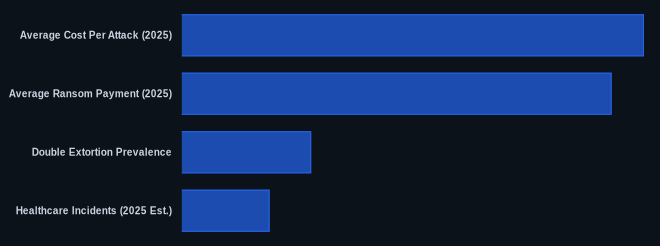
| Metric | Value | Source |
|---|---|---|
| Projected Ransomware Increase | 15-20% | Cybersecurity Ventures (mid-2025 predictions) |
| Average Cost Per Attack (2025) | $5.3 million | IBM Cost of a Data Breach Report 2025 (extrapolated) |
| Average Ransom Payment (2025) | $1.8 million | Chainalysis (extrapolated) |
| Double Extortion Prevalence | >80% | Palo Alto Networks Unit 42 2026 Threat Report (extrapolated) |
| Healthcare Incidents (2025 Est.) | ~18% of attacks | Mandiant/CrowdStrike 2025 Threat Reports (extrapolated) |
The CVEDaily Take
Many teams overemphasize signature-based detections for ransomware, missing the subtle pre-encryption behaviors that correlation rules can catch. We find that combining even two low-severity alerts, like a user failing 5 logins within a minute followed by a new process spawning from that same IP, provides a much higher-fidelity signal than individual alerts. When was the last time your SIEM team reviewed and optimized correlation rules for lateral movement and credential access preceding data exfiltration?
Tools & Resources
Using the right tools can make the difference between early detection and a full-blown crisis. Focus on capabilities that provide granular visibility and automated response.
Detection (EDR/SIEM)
- SentinelOne Singularity Platform: Offers AI-powered EDR with behavioral detection capabilities to identify and halt ransomware activity, even unknown variants, before encryption. It provides deep visibility into process execution and file system changes.
- Splunk Enterprise Security (ES): A powerful SIEM that aggregates logs from across your environment, enabling complex correlation rules and anomaly detection essential for spotting multi-stage attacks.
Prevention (Controls/Hardening)
- Veeam Backup & Replication: Provides comprehensive data backup, recovery, and replication, crucial for ransomware resilience. Its capabilities include immutable backups to prevent ransomware from tampering with recovery points.
- YubiKey: A hardware security key that provides strong multi-factor authentication (MFA), significantly reducing the risk of credential theft and phishing attacks for accessing critical systems.
Incident Response (Forensics/Containment)
- Cisco Secure Endpoint (formerly AMP for Endpoints): Provides real-time visibility, threat detection, and forensic capabilities, helping to quickly identify and contain compromised endpoints during an active incident.
- Wireshark: A widely used network protocol analyzer for deep inspection of network traffic. Essential for forensic analysis to identify C2 communications or exfiltration channels during a breach.
FAQ
-
Q: How to detect ransomware?
A: Look for rapid, high-volume file encryption or deletion activities on endpoints, often preceded by unusual privilege escalation or lateral movement. Correlate low-severity SIEM alerts, such asmultiple failed loginsfollowed bynew process creationandfile modificationalerts from the same source. Watch for outbound network connections to suspicious C2 infrastructure or unusual spikes in encrypted traffic. -
Q: How to respond to a ransomware attack?
A: Immediately isolate infected systems by disconnecting them from the network, then disable all network shares to halt further encryption. Next, force a password reset for all privileged accounts. -
Q: How to prevent ransomware?
A: Implement mandatory multi-factor authentication (MFA) across all services and enforce a rigorous 3-2-1 backup strategy with immutable, air-gapped backups. Regularly patch all systems, prioritizing vulnerabilities on the CISA KEV list, and restrict administrative privileges to enforce least privilege.