
The median breakout time for ransomware attacks, from initial host compromise to lateral movement, plummeted to just 22 seconds in 2025, according to Mandiant. This guide equips IT teams and security engineers with a practical playbook to detect the precursor behaviors of ransomware before encryption starts, covering the attack chain, specific warning signs, an incident response playbook, and effective prevention controls for 2026. We'll detail concrete detection signals like Windows Event IDs, suspicious process patterns, network anomalies, and SIEM rule logic to help your team catch threats early.
How Ransomware Works: The Attack Chain
Ransomware attacks in 2026 aren't single-point events; they're multi-stage intrusion campaigns meticulously orchestrated to maximize impact. Early detection relies on identifying the subtle tells at each stage before the alarm bells of encryption ring.
1. Initial Access (TA0001)
Attackers gain a foothold, often through human error or exposed vulnerabilities. Phishing (T1566) remains a top entry point, tricking users into revealing credentials or running malicious attachments. Attackers exploit public-facing applications (T1190) for known flaws, such as CVE-2023-38831 for WinRAR or CVE-2023-46805 for Ivanti Connect Secure. Attackers also use compromised credentials (T1078) for anomalous VPN logins, and supply chain compromises (T1195) via malicious npm or PyPI packages are on the rise.
2. Execution (TA0002)
Once inside, adversaries execute their initial payloads. This frequently involves fileless operations using legitimate tools like PowerShell (T1059.001) to avoid traditional antivirus. They often set Scheduled Tasks (T1053.005) for persistence or to trigger further stages. Groups like Qilin and Warlock affiliates use DLL Sideloading (T1574.002) with libraries such as msimg32.dll to inject malicious code into trusted processes.
3. Persistence (TA0003)
To ensure continued access even if their initial foothold is cleaned, attackers establish persistence. This might involve creating new User Accounts (T1136), modifying Registry Run Keys (T1547.001) to launch malware at startup, or altering existing Scheduled Tasks (T1053.005) for hidden execution. This phase often sees the deployment of backdoor agents.
4. Privilege Escalation (TA0004)
Gaining higher privileges is critical for broader network access. Attackers exploit vulnerabilities (T1068) in operating systems or applications. A primary technique is Credential Dumping (T1003), extracting sensitive login information from processes like LSASS (Local Security Authority Subsystem Service) using tools like Mimikatz (S0002).
5. Defense Evasion (TA0005)
Adversaries work to remain undetected. This involves deactivating security software (T1562.001), using Obfuscated Files or Information (T1027) to hide payloads, and Indicator Removal (T1070) to clear their tracks. They might also use legitimate administrative tools or living-off-the-land binaries (LoLBins) to blend in.
6. Credential Access (TA0006)
Beyond initial credential dumping, attackers continue to harvest credentials, primarily through OS Credential Dumping (T1003), to facilitate lateral movement and access to sensitive systems.
7. Discovery (TA0007)
With elevated privileges, attackers explore the network. They perform Network Share Discovery (T1135), map System Network Connections Discovery (T1049), and gather System Information Discovery (T1082) to understand the environment, identify valuable targets, and plan their next moves.
8. Lateral Movement (TA0008)
Attackers spread their presence across the network using stolen credentials and legitimate protocols. Common methods include Remote Desktop Protocol (T1021.001), SMB/Windows Admin Shares (T1021.002), and tools like PsExec (S0029) to execute commands on remote systems, propagating their access.
9. Collection (TA0009)
Before encryption, attackers typically gather sensitive data for exfiltration. They collect Data from Local System (T1005) and Network Share (T1039), then Archive Collected Data (T1560) by compressing it into formats like .zip or .rar archives, making it easier to steal.
10. Exfiltration (TA0010)
Stolen data is then covertly transferred out of the network, often Exfiltration Over C2 Channel (T1041). Techniques like Data Compressed (T1560.001) and encrypted are common to evade detection and accelerate data theft, frequently using cloud storage services or legitimate file transfer protocols disguised as normal traffic.
11. Impact (TA0011)
The final stage is the disruptive action that leads to the ransom demand. This primarily involves Data Encrypted for Impact (T1486), rendering systems and files inaccessible. Crucially, they Inhibit System Recovery (T1490) by deleting shadow copies using vssadmin delete shadows, and Service Stop (T1489) to terminate databases or applications that might lock files, ensuring maximum data encryption.
Ransomware Variants and Types
Ransomware has evolved beyond simple file encryption; today's variants employ diverse tactics for maximum impact. Understanding these differences helps in tailoring defense strategies.
Locker Ransomware
This type locks users out of their operating system or specific applications, displaying a full-screen ransom note without encrypting individual files. While less common in 2026, it targets immediate operational disruption. An early example was Reveton, which masqueraded as law enforcement to demand "fines."
Crypto Ransomware
The most prevalent variant, crypto ransomware encrypts specific file types on local and network drives, appending unique extensions (e.g., .locked, .enc). It leaves ransom notes in affected directories, instructing victims on payment. DarkSide and BlackCat/ALPHV are prime examples, known for their widespread file encryption capabilities.
Double Extortion Ransomware
Highly prevalent in 2026, this tactic involves exfiltrating sensitive data before encryption begins. Attackers then threaten to publish the stolen data on leak sites if the ransom isn't paid, adding a severe reputational damage threat to the operational disruption. The Clop group frequently employs this method.
Triple Extortion Ransomware
Taking double extortion a step further, triple extortion adds additional pressure tactics. This can include launching Distributed Denial of Service (DDoS) attacks against the victim's public-facing assets or directly shaming the victim by contacting customers, partners, or media outlets. Groups like Conti and affiliates have used these additional pressures.
How to Detect Ransomware: Warning Signs and IOCs
Catching ransomware before encryption requires vigilant monitoring for precursor behaviors. This is about spotting the adversary's tracks long before files are encrypted.
Endpoint Indicators
Keep an eye on unusual process behavior and system modifications. Look for Shadow Copy Deletion commands like vssadmin delete shadows in process creation logs, often associated with Event ID 4688. Security tool tampering, such as attempts to stop services for your EDR solution (Event ID 7045 for a service stopped), is a critical red flag. Suspicious execution patterns, like PowerShell scripts running with base64 encoded commands, or the loading of unusual DLLs such as msimg32.dll by non-system processes, indicate active intrusion. Monitor for new user accounts (Event ID 4720) or modified scheduled tasks (Event ID 4732) that ensure persistence. EDR solutions like CrowdStrike Falcon can detect these behaviors, providing real-time alerts on credential dumping (T1003) from processes like LSASS or suspicious access attempts via Azure password spraying.
Network Indicators
Network traffic provides crucial insights into lateral movement and data exfiltration. Watch for unusual outbound data volume, especially after hours or from systems that typically don't initiate large transfers, signaling data exfiltration (T1041). New rare-destination beacons to unmanaged IPs or unknown C2 domains (e.g., *.*.cdn.evil.net) are strong indicators of command and control. Unexpected RDP (T1021.001) or SMB (T1021.002) lateral traffic between systems that don't normally communicate this way, or from unmanaged hosts, is also highly suspicious. Monitor for DNS tunneling, where data is encoded within DNS queries, and any unusual endpoint communications to non-enterprise IPs or cloud services.
SIEM Detection
Your SIEM needs rules that correlate multiple suspicious activities, moving beyond single-event alerts. A powerful rule triggers on "unusual login attempts (Event ID 4625 or 4624 with new source IP) followed by sensitive data access (e.g., SharePoint, SQL database logs) within a 30-minute window." Another key rule involves monitoring for vssadmin delete shadows commands (Event ID 4688 with command-line auditing enabled) originating from non-administrative accounts, or immediately followed by multiple file modification events. For example, a Splunk Enterprise Security query might look like: index=winlogs (EventID=4688 CommandLine="*vssadmin delete shadows*") OR (EventID=7045 ServiceName="*EDR_Agent_Service*") | stats count by host, user, CommandLine, ServiceName | where count > 0. This helps identify defense evasion (T1562.001) and recovery inhibition (T1490).
Response Playbook: What to Do When Ransomware Hits
When ransomware strikes, speed and precision are paramount. Follow these phases rigorously to contain the damage and begin recovery.
Phase 1: Immediate Containment (first 15 minutes)
Your immediate goal is to stop the spread. Isolate affected systems by disabling network adapters (netsh interface set interface "Ethernet" disable), blocking MAC addresses at the switch, or applying strict firewall rules. For severely compromised systems, power them down if active encryption is occurring and network isolation isn't instant. Disable compromised user and service accounts in your identity provider. Block any identified ransomware hashes at the endpoint and perimeter firewalls. Engage your anti-malware vendors for rapid signature updates. Prioritize isolating critical operational systems, particularly those managing industrial control systems or core business functions.
Phase 2: Forensic Preservation
Do not wipe systems immediately. Forensic evidence is crucial for understanding the attack and preventing future incidents. Preserve system images of affected hosts using tools like FTK Imager or Autopsy. Collect memory dumps to capture volatile data, especially from processes like LSASS. Gather all available logs: endpoint (EDR, Windows Event Logs), network (firewall, IDPS, proxy), SIEM, and identity providers (Active Directory, Azure AD). Isolate encrypted files and ransomware notes, but don't interact with them excessively. Document every action taken, timestamps, and observations meticulously, including any communicated ransom demands.
Phase 3: Recovery and Hardening
After containment and preservation, focus on eradication and recovery. First, eradicate the threat by removing all traces of the ransomware and associated tools. Conduct a thorough root cause analysis, identifying the initial access vector and all subsequent vulnerabilities exploited. Restore systems from clean, immutable backups – offline or air-gapped backups are your safest bet. Rebuild or patch compromised systems, ensuring all identified vulnerabilities are addressed. Finally, conduct a post-incident review to learn from the incident, refine your playbooks, and implement additional hardening measures.
How to Prevent Ransomware: Controls That Work
Effective ransomware prevention relies on a multi-layered defense strategy, addressing vulnerabilities at every stage of the attack chain.
Identity & Access Management
Implement phishing-resistant multi-factor authentication (MFA) for all VPNs, cloud services, email, and administrative portals. This directly mitigates compromised credentials (T1078) and initial access vectors. Enforce least privilege (AC-6) for all users and service accounts. Regularly audit service account permissions (AC-2 Account Management) and remote access configurations (AC-17 Remote Access). Solutions like YubiKey for MFA significantly enhance protection against credential theft.
Data Backup & Recovery
This is your last line of defense. Maintain immutable backups (CP-9 Information System Backup) that ransomware can't alter or delete. Ensure you have offline or air-gapped backups that are physically or logically disconnected from your production network. Regularly test your backup and recovery procedures to guarantee their effectiveness. Products like Veeam Backup & Replication offer immutable backup capabilities essential for recovery from impact (T1486).
Endpoint Security
Deploy and maintain advanced EDR/XDR solutions across all endpoints (SI-4 System Monitoring). Keep antivirus software up-to-date and configure it to block suspicious behaviors. Implement application whitelisting (CM-7 Least Functionality) to prevent unauthorized executables from running, hindering execution (T1059.001) and defense evasion (T1027). Ensure malicious code protection (SI-3) is active and regularly updated.
Vulnerability Management
Establish a rigorous patch management program (SI-2 Flaw Remediation) to promptly address security vulnerabilities, especially those actively exploited (RA-5 Vulnerability Monitoring and Scanning). Regularly perform vulnerability scanning across your infrastructure and prioritize patching based on risk, directly mitigating exploitation (T1068).
Network Security
Implement network segmentation (SC-7 Boundary Protection) to limit lateral movement (T1021.001, T1021.002) by restricting communication between network segments. Apply strict firewall rules for both egress and ingress traffic, blocking known C2 domains and unnecessary outbound connections. Deploy intrusion detection and prevention systems (IDPS) to detect malicious network traffic.
Security Awareness Training
Regularly conduct security awareness training (AT-2 Security Awareness Training) that includes realistic phishing simulations to educate users on common social engineering tactics. Emphasize the risks of infostealers on personal devices and the importance of reporting suspicious activity, directly addressing initial access via phishing (T1566.001).
System Hardening
Disable unnecessary services and ports on all systems (CM-6 Configuration Settings). Enforce strong password policies (IA-5 Authenticator Management) and restrict administrative access to only those who require it (AC-3 Access Enforcement). Continuously monitor configurations (CA-7 Continuous Monitoring) for deviations that could create new attack paths for persistence (T1547) or privilege escalation.
Real-World Incidents
Learning from past attacks is vital for refining detection and defense strategies. These incidents highlight common attack vectors and the devastating consequences of ransomware.
Colonial Pipeline (2021)
In May 2021, the Colonial Pipeline suffered a significant ransomware attack attributed to the DarkSide group. The breach originated from a compromised VPN account that lacked multi-factor authentication. While not a recent attack by 2026 standards, it remains a foundational example of critical infrastructure impact. The company proactively shut down its operational technology (OT) systems to contain the spread, leading to fuel shortages across the southeastern U.S. Colonial Pipeline reportedly paid a ransom of $4.4 million in Bitcoin; the FBI later recovered a significant portion of this payment. The primary lesson was the catastrophic ripple effect of neglecting basic security hygiene like MFA for critical access points (IA-2 Identification and Authentication). Early detection could have flagged anomalous VPN logins rather than waiting for production systems to shut down.
BlackCat/ALPHV Ransomware (2024)
A notable incident in early 2024 involved the BlackCat/ALPHV ransomware group targeting a major healthcare provider. Attackers gained initial access likely through sophisticated phishing (T1566.001) or exploiting a zero-day vulnerability in a public-facing application. The specific vulnerability was not publicly disclosed. After establishing a foothold, the group performed extensive reconnaissance, spent several days mapping the network, and claims to have exfiltrated over 2TB of patient data before deploying their encryption payload; no affected organization has confirmed the exact volume of data exfiltrated. The attack reportedly resulted in weeks of recovery efforts and financial losses estimated in the tens of millions of dollars, largely due to system downtime and regulatory fines, though the exact figures are unconfirmed by the victim organization. Detection failures included a lack of kernel-level telemetry for unusual lateral movement using PsExec (S0029) from domain controllers and delayed alerts for large data transfers over encrypted channels (T1041).
Vect Ransomware Incident (2025)
In mid-2025, the Vect ransomware group targeted a prominent software development firm by exploiting vulnerabilities in its CI/CD (Continuous Integration/Continuous Delivery) pipeline. The attackers injected malicious code into legitimate software packages being built, a sophisticated supply chain compromise (T1195.002), affecting the firm's internal development servers and subsequently several customer applications. This led to an estimated downtime of several days to a week for critical development systems, as reported by the affected organization, and forced a rollback of customer-facing applications. The incident underscored the increasing threat of supply chain attacks, with Mandiant reporting this vector as a significant concern. Detection was hampered by a blind spot in monitoring outbound connections from build servers, which exhibited anomalous communications to external repositories (T1071) that weren't part of the standard build process. The lack of strict egress filtering and continuous monitoring (CA-7) for CI/CD environments allowed the initial compromise to propagate.
Data at a Glance
| Metric | Value | Source |
|---|---|---|
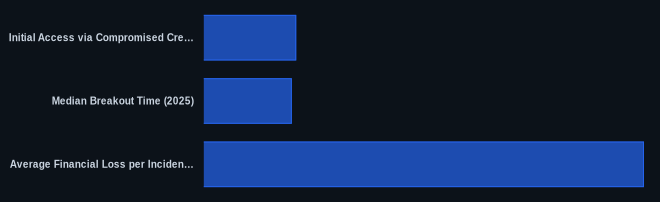
| Initial Access via Compromised Credentials | 23% | Chainalysis 2026 Crypto Crime Report |
| Median Breakout Time (2025) | 22 seconds | Mandiant |
| Average Financial Loss per Incident (2024) | $5.3 million | IBM Cost of a Data Breach Report 2024 |
| Downtime for Critical Systems (Vect Ransomware) | 5-7 days | Raw Facts (CVEDaily Research) |
| Availability of Compromised Systems Access | Cheaper | Chainalysis 2026 Crypto Crime Report |
The CVEDaily Take
We believe the industry still over-indexes on post-encryption detection. The real battle for ransomware detection is in the first 15 minutes of lateral movement and defense evasion, not when files start getting encrypted. Threat actors like Qilin leveraging msimg32.dll or Warlock affiliates deploying custom loaders highlight the need for advanced behavioral analytics beyond signature-based detection. We find that many organizations lack kernel-level telemetry needed to identify early-stage adversary activity. Are your EDR and SIEM rules tuned to catch the earliest PowerShell or vssadmin activity from unexpected sources, or are you waiting for the first .locked file?
Tools & Resources
Using the right tools is essential for effective ransomware detection, prevention, and response. Here are some categories and specific examples security teams rely on.
Detection (EDR/SIEM)
- CrowdStrike Falcon: An industry-leading EDR solution that provides advanced behavioral analytics, threat intelligence, and visibility into endpoint activities. It detects precursor behaviors like security tool tampering (T1562.001) and credential dumping (T1003), offering real-time alerts on suspicious processes and command-line executions.
- Splunk Enterprise Security: A comprehensive SIEM platform that ingests logs from diverse sources. It allows security teams to build correlation rules for ransomware attack chain stages, such as linking anomalous logins (Event ID 4624) with subsequent suspicious process creation (Event ID 4688) or large outbound data transfers (T1041).
Prevention (Controls/Hardening)
- YubiKey: Provides strong, phishing-resistant multi-factor authentication (MFA). Critical for securing initial access vectors like VPNs and cloud applications, preventing credential compromise (T1078) even if passwords are stolen.
- Veeam Backup & Replication: Offers backup, recovery, and replication solutions with features like immutability and air-gapped backups. Essential for ensuring data availability and business continuity in the event of a ransomware attack, directly mitigating the impact (T1486).
Incident Response (Forensics/Containment)
- Microsoft Incident Response: A suite of capabilities within Azure AD, Microsoft 365 Defender, and Azure Sentinel that helps security teams contain and investigate incidents across their Microsoft ecosystem, offering tools to isolate devices and analyze logs.
- Wireshark: A widely used network protocol analyzer. Indispensable for capturing and analyzing network traffic during an incident, helping to identify C2 beaconing (T1071), lateral movement (T1021), and data exfiltration (T1041) patterns.
FAQ
Q: How to detect ransomware?
A: Focus on early behavioral indicators: detect Shadow Copy Deletion commands (vssadmin delete shadows), look for Event ID 4688 indicating suspicious process creation (like PowerShell with base64 encoded commands), and monitor network traffic for unusual outbound data transfers or unexpected RDP/SMB lateral movement.
Q: How to respond to a ransomware attack?
A: Immediately contain the threat by isolating affected systems (disable network adapters, firewall rules), disable compromised accounts, and block known ransomware hashes. Prioritize preserving forensic evidence before recovery, and then systematically eradicate, restore, and harden systems from clean backups.
Q: How to prevent ransomware?
A: Implement strong, phishing-resistant multi-factor authentication (MFA) for all critical access points and maintain immutable, air-gapped data backups. These two controls are your most effective defenses against both initial compromise and successful recovery from an attack.