Phishing accounts for over 70% of initial attack vectors in 2024, according to Mandiant's M-Trends 2024 report. Its early detection is crucial for preventing costly breaches. This guide provides security engineers with specific signals, a concise response playbook, and actionable prevention controls to defend against phishing attacks. We'll detail the attack chain, highlight critical behavioral and log anomalies often overlooked, and cover real-world incidents like the Uber (2022) breach to sharpen your defense strategy.
How Phishing Attack Works: The Attack Chain
A successful phishing attack is a multi-stage operation, much like a targeted demolition project where the initial "detonation" is just the first step. Attackers meticulously plan, execute, and exploit vulnerabilities, moving from initial access to their final objectives. Understanding this progression enables effective detection.
1. Reconnaissance (Pre-Attack)
Attackers begin by gathering open-source intelligence on targets. They scour LinkedIn, company websites, and public records for employee names, roles, email formats, and organizational structures. This phase helps them craft highly convincing lures.
2. Weaponization/Delivery (MITRE ATT&CK T1566: Phishing)
This is the attack's "detonator." Attackers send tailored emails, SMS messages (smishing), or even voice calls (vishing) designed to trick victims. These lures often mimic legitimate communications, prompting users to click a malicious link or open an infected attachment. Business Email Compromise (BEC) often skips this with direct impersonation.
3. Exploitation/Execution (MITRE ATT&CK T1204: User Execution)
When a victim clicks a malicious link, they're typically redirected to a credential harvesting page or a drive-by download site. If they open an attachment, weaponized documents (like macro-enabled Word or Excel files) trigger malware execution. This stage often deploys info-stealers, Remote Access Trojans (RATs), or early-stage ransomware.
4. Installation (MITRE ATT&CK T1547: Boot or Logon Autostart Execution, T1053: Scheduled Task/Job)
Post-execution, malware establishes persistence on the compromised endpoint. This could involve creating new scheduled tasks, modifying registry run keys, or installing new services. Without persistence, the attacker loses access after a reboot.
5. Command and Control (C2 – MITRE ATT&CK T1071: Application Layer Protocol)
The installed malware initiates communication with the attacker's C2 server. This channel acts as the remote control, allowing the attacker to issue commands, download additional tools, and prepare for data exfiltration or further compromise. This traffic might use common ports like 443 (HTTPS) or 80 (HTTP) to blend in.
6. Actions on Objectives (MITRE ATT&CK T1486: Data Encrypted for Impact, T1003: OS Credential Dumping, T1041: Exfiltration Over C2 Channel)
With persistent access and C2 established, attackers pursue their goals. This ranges from harvesting credentials (T1003) from local systems, exfiltrating sensitive data (T1041) to their servers, deploying ransomware (T1486) like LockBit or BlackCat, or conducting financial fraud.
Phishing Attack Variants and Types
Phishing is a diverse set of tactics, each with specific technical distinctions that demand varied detection strategies. Think of them as different fishing lures, each designed for a particular type of "fish."
Credential Harvesting Phishing
This variant focuses on spoofing legitimate login pages (e.g., Microsoft 365, internal VPN portals) to steal user credentials. The distinction lies in the attackers' use of HTML/CSS mirroring and backend scripts to capture submitted usernames and passwords, often paired with URL shorteners or subtly misspelled domains. The Mailchimp (2022) breach saw attackers use compromised employee credentials obtained via such phishing.
Malware Delivery Phishing
Here, the goal is to install malicious software (e.g., Agent Tesla, RedLine Stealer, or initial ransomware payloads) onto the victim's system. It's distinguished by malicious attachments (e.g., .zip archives containing .hta, .js, or macro-enabled documents) or drive-by download links, triggering endpoint detection alerts during execution.
Business Email Compromise (BEC)
Highly sophisticated social engineering, BEC impersonates trusted entities (e.g., CEO, vendor CFO) to initiate fraudulent wire transfers or data disclosures, often bypassing traditional email security due to the absence of malicious links or attachments. This relies heavily on email header analysis and sender authentication inconsistencies. The IC3 reported over $2.9 billion in BEC losses in 2023.
Adversary-in-the-Middle (AiTM) Phishing
An advanced emerging trend that effectively bypasses MFA by proxying legitimate login pages in real-time, intercepting credentials and valid session cookies. This allows attackers to replay the session token, gaining authenticated access without directly cracking MFA. The Uber (2022) incident demonstrated AiTM's effectiveness by overwhelming an employee with MFA push notifications.
How to Detect Phishing Attack: Warning Signs and IOCs
Effective phishing detection requires integrating signals across your environment, acting like a multi-spectral sensor array for subtle anomalies. Security teams often overlook the critical correlation between unusual authentication events and subsequent resource access attempts.
Endpoint Indicators
Monitor for suspicious process creation and system modifications. On Windows, a critical signal is Event ID 4625 (Audit Failure) indicating failed logon attempts, especially when followed by a successful Event ID 4624 from an unusual source IP. Look for processes spawning from common email clients (like outlook.exe or thunderbird.exe) executing scripts (e.g., powershell.exe, cmd.exe) or unusual executables.
CrowdStrike Falcon frequently flags "Suspicious Process Activity" or "Behavioral AI Detection" for malware execution, such as a PDF reader launching mshta.exe or powershell.exe. Registry modifications, particularly to run keys (HKLM\Software\Microsoft\Windows\CurrentVersion\Run), or the creation of new scheduled tasks (Event ID 4698) can indicate persistence mechanisms (MITRE ATT&CK T1547).
Network Indicators
Scrutinize outbound network traffic for anomalies. Look for DNS requests to newly registered domains, known malicious IPs, or domains exhibiting typosquatting (e.g., micros0ft.com instead of microsoft.com). Monitor for connections over non-standard ports or unusual protocols to external IPs. Traffic spikes to unknown or foreign cloud providers that aren't part of your legitimate operations can be a strong indicator of C2 communication (MITRE ATT&CK T1071). Firewall or proxy logs showing connections to blacklisted domains from threat intelligence feeds are also immediate red flags.
SIEM Detection
Your SIEM (e.g., Splunk, Elastic, Microsoft Sentinel) is your central correlation engine. The most critical, often missed, detection involves correlating authentication logs with subsequent resource access and MFA bypass attempts.
Sample Splunk Query for Suspicious Login/Access:
(source=authentication_logs OR source=proxy_logs OR source=edr_alerts)
| eval risk_score = 0
| eval risk_score = if(match(event_description, "unusual login time"), risk_score + 20, risk_score)
| eval risk_score = if(match(source_ip_geo, "unusual geography"), risk_score + 30, risk_score)
| eval risk_score = if(match(event_description, "MFA bypass attempt"), risk_score + 50, risk_score)
| eval risk_score = if(match(destination_resource_type, "non-standard resource"), risk_score + 40, risk_score)
| where risk_score >= 80
| stats count by user, source_ip, risk_score
This rule would detect high-risk scenarios like a user logging in from a new country (Okta authentication logs, like those involved in the Lapsus$ incident targeting Okta itself), then immediately attempting to access an internal SharePoint site they don't normally use, especially if preceded by Event ID 4625 (failed logon) from the same IP. SIEM alerts should prioritize these combined indicators.
Response Playbook: What to Do When a Phishing Attack Hits
When a phishing attack yields initial access, every minute counts. Your response playbook needs to be a well-rehearsed symphony, not a frantic improvisation.
Phase 1: Immediate Containment (first 15 minutes)
Your priority is to stop the bleed. Immediately isolate any potentially compromised systems. This means network isolation – disabling network adapters, applying host-based firewall rules to block all outbound/inbound connections except those needed for management, or moving the host to a quarantined VLAN. Lock and force a password reset for any compromised user accounts. Revoke active session tokens (e.g., Microsoft 365 tokens) for the affected user. Block identified malicious IPs and domains at your perimeter firewalls and web proxies.
Phase 2: Forensic Preservation
Before you clean anything, preserve the crime scene. Create full disk images of compromised endpoints using forensic tools like FTK Imager or EnCase. Collect volatile data: memory dumps, running processes, network connections, and open files. Preserve all relevant logs: email gateway logs for the original phishing email, firewall/proxy logs for C2 communication, EDR logs for process execution, and authentication logs for initial access. Maintain a strict chain of custody for all collected evidence. Notify internal stakeholders (legal, HR, PR) and prepare for regulatory reporting requirements, such as reporting to CISA within 72 hours for critical infrastructure (CIRCIA).
Phase 3: Recovery and Hardening
After containment and preservation, move to eradication and recovery. Eradicate malware by terminating malicious processes, deleting files, and disabling persistence mechanisms (scheduled tasks, startup items). Patch any identified vulnerabilities that attackers exploited. Restore affected systems from known-good, immutable backups. Validate your environment with scans and penetration tests to ensure the threat is fully removed. Finally, update your incident response plan and conduct a thorough post-incident review. For credential harvesting, consider a phased, enterprise-wide password reset if the scope is broad, and deploy hardware MFA like YubiKey for critical accounts.
How to Prevent Phishing Attack: Controls That Work
Preventing phishing is a layered defense problem, not a single silver bullet. Just like a ship needs multiple bulkheads, your organization requires comprehensive controls mapped to established frameworks.
Security Awareness Training (NIST AT-2, AT-3)
Regular, interactive training combined with simulated phishing campaigns is essential. Don't just lecture; test your users. Teach them to spot a mismatched sender domain, urgent language, or an email requesting unusual actions. This maps to MITRE ATT&CK T1566.001 and T1566.002 mitigations by making users less susceptible to lures.
Email Security Gateways (NIST SC-8, SC-7)
Implement email security platforms (e.g., Proofpoint, Mimecast) with advanced anti-spam, anti-phishing filters, and URL rewriting/sandboxing capabilities. Crucially, configure SPF, DKIM, and DMARC to validate sender authenticity, mitigating impersonation and BEC attempts. This directly addresses MITRE ATT&CK T1566.001 and T1566.002.
Multi-Factor Authentication (MFA) (NIST IA-2, IA-5)
Deploy ubiquitous MFA for all critical systems, especially cloud applications and VPNs. While not foolproof against AiTM attacks, MFA significantly raises the bar. Consider hardware tokens like YubiKey for high-privilege accounts, which are more resistant to phishing than SMS or push-based MFA. This mitigates MITRE ATT&CK T1110.001 and T1110.003.
Endpoint Protection Platforms (EPP) & EDR (NIST SI-3, RA-5)
Next-generation antivirus (NGAV) and Endpoint Detection and Response (EDR) solutions like CrowdStrike Falcon or SentinelOne are critical. They detect and prevent malware execution, identify suspicious process activity, and block C2 communications, mapping to MITRE ATT&CK T1204.002, T1105, and T1562.001 mitigations. Ensure regular updates.
Web Filtering/DNS Filtering (NIST SC-7, SC-8)
Block known malicious websites and domains at the network perimeter and DNS level using solutions like Cloudflare Gateway or Cisco Umbrella. This prevents users from reaching credential harvesting sites or drive-by download pages, mitigating the exploitation phase. It's an effective defense against MITRE ATT&CK T1566.001.
Network Segmentation (NIST AC-6, SC-7)
Implement least privilege network access and segment your networks (e.g., VLANs) to limit the blast radius of a successful phishing attack. If one system is compromised, attackers shouldn't have free rein across your entire network. This limits lateral movement (MITRE ATT&CK T1021.001).
Regular Software Updates & Patch Management (NIST SI-2, SA-11)
Timely patching of operating systems, applications, and firmware closes vulnerabilities that malware often exploits. Attackers frequently use well-known CVEs. This directly mitigates various MITRE ATT&CK techniques by removing common exploitation paths.
Data Backup & Recovery (NIST CP-9)
Maintain regular, air-gapped or immutable backups of critical data using solutions like Veeam or Acronis. In the event of a ransomware attack via phishing, having clean backups is your last line of defense for recovery, mitigating the impact of MITRE ATT&CK T1486.
Real-World Incidents
Examining recent phishing incidents provides tangible lessons, showing where defenses failed and how detection could have been improved. These aren't just stories; they're case studies for your defense.
Okta (Jan 2022)
The identity and access management provider Okta suffered a phishing attack targeting a third-party customer support engineer at Sykes, a contractor. Attackers, part of the Lapsus$ group, gained access to the engineer's laptop and subsequently to Okta's internal systems. This gave them the ability to potentially reset MFA for some customers and access customer data. Okta stated the breach was contained to the third-party engineer's laptop and did not result in access to their production systems, but the group claimed to have accessed over 2,500 customer credentials; Okta has not confirmed this claim.
Lesson: Over-reliance on vendor security, especially concerning access to sensitive systems. Ensure strong third-party security assessments and privileged access management.
Mailchimp (Aug 2022)
Mailchimp, an email marketing service, experienced a breach after attackers compromised employee credentials through a phishing attack. These stolen credentials granted access to internal tools and a subset of customer accounts, predominantly in the cryptocurrency and financial sectors. Attackers then used legitimate Mailchimp customer accounts to send further phishing emails to those customers' contact lists, demonstrating a secondary exploitation of the trusted platform. This was Mailchimp's second breach in less than a year. The company confirmed the breach, but the exact number of compromised customer accounts has not been publicly released beyond "a subset."
Lesson: Insider threat or compromised employee credentials are a high-value target. Stricter access controls and constant monitoring of internal system access are crucial, alongside strong email security and advanced MFA.
Uber (Sep 2022)
In one of the highest-profile incidents of 2022, Uber fell victim to an extensive phishing attack that led to an employee accepting repeated MFA requests. The attackers, identified as Lapsus$, compromised the employee's Slack account and subsequently gained access to a wide array of Uber's internal network resources, including G-Suite, AWS, and other critical infrastructure. The attacker claimed to have exfiltrated sensitive data and posted screenshots of internal systems; Uber confirmed the breach and the compromise of several internal systems but did not confirm specific data exfiltration claims beyond initial access. The attack led to a significant internal disruption and public scrutiny.
Lesson: MFA fatigue and sophisticated AiTM phishing (or simply overwhelming push notifications) are real threats. Implement contextual MFA, re-authentication challenges, and user education specifically on avoiding MFA bombing. Behavioral analytics on login patterns could have flagged this earlier.
Data at a Glance
| Metric | Value | Source |
|---|---|---|
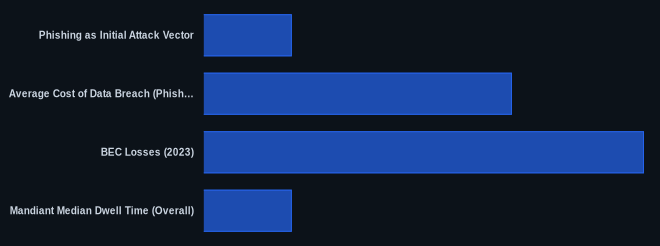
| Phishing as Initial Attack Vector | 70% | Mandiant M-Trends 2024 |
| Average Cost of Data Breach (Phishing) | Over $4 million USD | IBM Cost of a Data Breach Report 2023 |
| BEC Losses (2023) | Over $2.9 billion USD | IC3 2023 PSA |
| Mandiant Median Dwell Time (Overall) | 84 days (Americas) | Mandiant M-Trends 2024 |
| Phishing Attack Trend (2023-2024) | Increasing in sophistication and volume | Mandiant M-Trends 2024 |
The CVEDaily Take
Many security teams over-focus on email gateway alerts and miss the high-fidelity signals that indicate a successful phishing attack has already transitioned into post-exploitation activity. We think that correlating seemingly disparate events—like an unusual login location from authentication logs, followed by an immediate attempt to access a non-standard internal resource, especially when paired with MFA bypass attempts—is a critical, early indicator that deserves more attention than a single "suspicious link" alert. What specific SIEM queries are you running to connect these dots in your environment today?
Tools & Resources
Detection (EDR/SIEM)
- CrowdStrike Falcon: An industry-leading EDR solution providing next-gen antivirus, endpoint detection, and threat intelligence. It's crucial for detecting post-phishing malware execution and anomalous process activity.
- CrowdStrike Falcon Platform
- Splunk Enterprise Security: A SIEM platform capable of ingesting logs from across your infrastructure, enabling advanced correlation rules for identifying complex attack patterns like those described in the SIEM detection section.
- Splunk Enterprise Security
Prevention (Controls/Hardening)
- YubiKey: A hardware security key offering strong, phishing-resistant multi-factor authentication, significantly reducing the risk of credential compromise.
- Proofpoint Email Security and Protection: Comprehensive email security gateway offering advanced threat protection, targeted attack protection, and email authentication (SPF, DKIM, DMARC) to block phishing attempts at the perimeter.
Incident Response (Forensics/Containment)
- FTK Imager: A free data preview and imaging tool that allows for forensic acquisition of disk images and volatile memory, essential for preserving evidence during incident response.
FAQ
-
Q: How to detect phishing attack?
A: Look for unusual login times/locations from authentication logs, correlation with subsequent access attempts to non-standard internal resources, and specific EDR alerts like "Suspicious Process Activity" (e.g., from CrowdStrike Falcon) indicating malware execution. -
Q: How to respond to a phishing attack?
A: First, immediately isolate compromised systems (e.g., network isolation, host-based firewalls). Second, lock and reset compromised user accounts, revoking any active session tokens. Third, block identified malicious IPs/domains at your perimeter. -
Q: How to prevent phishing attack?
A: Implement ubiquitous Multi-Factor Authentication (MFA), particularly phishing-resistant hardware tokens like YubiKey, and deploy an Email Security Gateway with strong SPF, DKIM, and DMARC enforcement.