How to Detect Social Engineering: Attack Chain, Warning Signs & Defense Playbook (2026)
Arup transferred $25.6 million in early 2024 after attackers used AI-powered deepfakes to impersonate senior executives. This guide equips security engineers with specific detection signals, a rapid-response playbook, and effective prevention controls to counter this specific threat, especially given that over 80% of social engineering is now AI-powered.
How Social Engineering Works: The Attack Chain
Social engineering is not a single event; it's a meticulously crafted attack chain that weaponizes human trust against technical controls. Attackers build a persona and narrative designed to bypass logical defenses.
1. Reconnaissance
Attackers begin by gathering open-source intelligence (OSINT) to craft highly personalized lures. This includes public social media profiles, company websites, news articles, and even dark web data dumps. They are looking for names, roles, relationships, project details, and communication styles. Techniques here often include T1592 (Gather Victim Org Info) and T1598 (Phishing for Information).
2. Pretexting/Impersonation
Next, attackers establish a false identity or scenario. This could be posing as an HR representative with an urgent policy update, an IT technician needing credential verification, or a CFO demanding an immediate wire transfer. AI makes this increasingly realistic, replicating voices and generating convincing deepfake videos. The MITRE ATT&CK technique T1566 (Phishing) covers these initial interaction attempts, including T1566.001 (Spearphishing Attachment) or T1566.002 (Spearphishing Link).
3. Exploitation
Once trust is established, the attacker uses psychological triggers. Urgency ("This needs to happen now!"), authority ("The CEO demands this!"), fear ("Your account will be suspended!"), or even curiosity ("Look at this scandalous photo!") bypass critical thinking. This phase creates cognitive overload to force a hasty decision. Attackers might push MFA notifications repeatedly (T1110.003 MFA Fatigue) to wear down a target.
4. Action on Objective
This is where the victim performs the desired action. It might involve divulging credentials, approving a fraudulent financial transaction, granting unauthorized network access via a remote tool, or installing malicious software like Emotet or QakBot. These actions often lead to T1078 (Valid Accounts) being compromised or T1133 (External Remote Services) being exploited.
5. Impact
The consequences of a successful social engineering attack range from immediate financial loss and data exposure to long-term system compromise and reputation damage. IBM reports the average BEC breach alone costs $4.89 million as of 2025, illustrating the severe impact these attacks can have.
Social Engineering Variants and Types
Social engineering manifests in various forms. Reports indicate 98% of cyberattacks involve social engineering, making familiarity with its variants critical.
Phishing (**T1566**)
This is the broadest category, involving email-based attacks designed to trick recipients into revealing sensitive information or clicking malicious links. AI has dramatically enhanced realism, often leading to T1566.001 (Spearphishing Attachment) or T1566.002 (Spearphishing Link). For instance, the BianLian ransomware group likely used phishing for initial access against Aspire Rural Health System in late 2024, affecting 138,386 people; the specific initial access vector was not publicly confirmed.
Vishing (Voice Phishing) (T1566.004, T1566.005)
Vishing uses voice communication to manipulate targets, often through phone calls. AI can replicate voices, making impersonation incredibly convincing. Vishing surged 442% from H1 to H2 2024, now comprising over 60% of phishing engagements, according to industry reports. Attackers might impersonate IT support asking for login details.
Pretexting (**T1566**)
This involves fabricating a believable scenario to gain trust, frequently leading to Business Email Compromise (BEC). Over 50% of social engineering incidents involve pretexting, including BEC scenarios. Coinbase faced a sophisticated pretexting attack in May 2025, where attackers, according to Coinbase, bribed overseas support staff to leak sensitive customer data.
MFA Fatigue (T1110.003)
Attackers repeatedly flood a user with Multi-Factor Authentication (MFA) push notifications until the user, out of annoyance or confusion, approves one. This technique bypasses a crucial security layer without needing the user's password. This type of attack is often used to gain initial access after credentials have been phished.
Deepfake Impersonation
This variant uses AI-generated video and voice clones to impersonate trusted individuals, especially in video calls. Arup's $25.6 million loss in early 2024 was a direct result of attackers employing deepfake video calls to impersonate a CFO and senior colleagues.
How to Detect Social Engineering: Warning Signs and IOCs
Detecting social engineering means looking beyond traditional malware signatures and focusing on behavioral and anomalous technical indicators. Reports indicate 36% of all 2025 incident response cases started with social engineering.
Endpoint Indicators
Keep an eye out for unusual user behaviors or process activities. An unexpected approval of an MFA push notification that wasn't self-initiated is a major red flag; users should reject immediately. On Windows systems, monitor for Event ID 4625 (An account failed to log on) occurring repeatedly from a single user or IP, which could indicate a post-phishing password spray. Look for Event ID 4688 (A new process has been created) where suspicious executables (e.g., cmd.exe running base64-encoded commands, powershell.exe with unusual arguments) are launched from unexpected locations like C:\Users\Public or temporary directories. EDR solutions like CrowdStrike Falcon or SentinelOne can surface alerts for "Unusual Logon Location," "Credential Access Attempt," or "Suspicious Command Line Activity," which are strong indicators of compromised accounts.
Network Indicators
Network traffic provides crucial clues. Monitor for unusual outbound DNS queries to newly registered domains (NRDs) or domains with low reputation scores, which might indicate command-and-control (C2) communication for malware dropped after a social engineering success. Look for HTTP/S connections to suspicious IP addresses or non-corporate cloud storage services that don't align with standard business operations. Traffic patterns showing unexpected logins from unfamiliar geographies, especially for privileged accounts, should trigger immediate investigation. DNS query logs showing excessive requests for domains known for phishing or hosting malicious content (blocked by email/web filters) can indicate a widespread campaign targeting your users.
SIEM Detection
Your Security Information and Event Management (SIEM) system is your central nervous system for detecting these anomalies. Implement rules to detect:
- Failed Login Spikes: A Splunk query like
index=windows sourcetype=WinEventLog:Security EventCode=4625 | stats count by IpAddress, user | where count > 5can flag repeated failed login attempts from a single IP and user within a short timeframe, suggesting MFA fatigue or credential stuffing post-phishing. - MFA Enrollment Changes: Alert on Event ID 4700 (An MFA factor was enrolled) or 4702 (MFA enrollment policy was changed) followed by new device registrations or logins from new geographies, as this could signal an attacker attempting to establish persistent access.
- Unusual Data Access: Correlate user login events with subsequent data access events across identity, financial, cloud, and collaboration systems. A sudden spike in access to sensitive SharePoint folders or Salesforce records by a user who rarely accesses them (e.g.,
index=cloud_access (app=sharepoint OR app=salesforce) earliest=-1h | stats count(object) as accessed_objects by user | where accessed_objects > 50) could indicate a compromised account performing data exfiltration.
Response Playbook: What to Do When Social Engineering Hits
A rapid, structured response can significantly mitigate the impact of a social engineering incident. Delay can turn a minor breach into a major catastrophe.
Phase 1: Immediate Containment (first 15 minutes)
The priority is to stop the bleeding.
- Do not reply to the attacker. Engaging further provides them with more information and confirms the validity of their attack vector.
- Save suspicious messages/evidence. Forward suspicious emails as an attachment to your security team, capture screenshots of suspicious chat messages, and record details of phone calls (date, time, numbers).
- Notify IT/security team immediately. Use an out-of-band channel (e.g., a known, verified phone number or in-person communication) to ensure the attacker isn't monitoring your primary communication.
- Isolate Compromised Systems: If a workstation is compromised, immediately disconnect it from the network (unplug Ethernet, disable Wi-Fi); do NOT power down as this can erase volatile memory forensics.
- Change Passwords: For all impacted user accounts, especially if credentials were divulged or reused. Force a password reset for the victim's account and any accounts they have access to.
- Enable/Reset MFA: For compromised accounts, ensure MFA is enabled and force a reset of all MFA tokens. Consider requiring re-enrollment of MFA devices.
- Account Lockdowns: Lock any accounts actively being used in the attack or showing suspicious activity.
Phase 2: Forensic Preservation
Before remediation, collect critical evidence.
- Disk Imaging: Create a forensic image of any compromised endpoints. Tools like FTK Imager or acquisition via an EDR agent can facilitate this.
- Log Collection: Gather all relevant logs:
- System logs (Windows Event Logs, Linux
syslog). - Application logs (web server, database, specific business applications).
- Network logs (firewall, router, proxy, DNS query logs from tools like Wireshark).
- Email logs (Office 365, Google Workspace audit logs, mail gateway logs for sent/received messages).
- Cloud platform logs (AWS CloudTrail, Azure Activity Logs).
- System logs (Windows Event Logs, Linux
- Network Traffic Capture: If the attack is ongoing or recent, capture network traffic using tools like Wireshark or network tap appliances to identify C2 channels or data exfiltration.
- Memory Dumps: Obtain memory dumps from compromised systems to identify active processes, network connections, and injected code that might not be on disk.
Phase 3: Recovery and Hardening
Once containment and preservation are complete, focus on restoring and strengthening defenses.
- Eradication: Remove all attacker presence, including malicious software, backdoors, and persistence mechanisms.
- System Restoration: Restore affected systems from known-good, clean backups. Verify integrity before bringing systems back online.
- Hardening: Implement new security controls or strengthen existing ones identified as weak points during the incident. This could include stricter firewall rules (T1562.001 Disable or Modify System Firewall), enhanced MFA policies, or new email filtering rules.
- Post-Incident Review: Conduct a thorough review to understand root causes, identify gaps, and update incident response plans.
- Continuous Monitoring: Enhance monitoring for indicators identified during the incident to detect recurrence.
- Notification Requirements: Inform internal stakeholders (legal, HR), law enforcement (FBI IC3, CISA), and adhere to regulatory deadlines (GDPR, CCPA) for affected individuals. The FBI IC3 reported global social engineering losses reached $16.6 billion in 2024.
How to Prevent Social Engineering: Controls That Work
Effective prevention of social engineering requires a multi-layered approach, blending technical controls with human awareness.
Employee Awareness and Training
Continuous, threat-informed employee training is paramount (NIST AT-2, AT-3, AT-4; CIS Control 14). Conduct AI-generated phishing and vishing simulations that mirror current threats. Foster a 'no-blame' reporting culture to encourage employees to report suspicious attempts without fear, turning them into a critical first line of defense. This approach drastically improves early detection, especially given that the human element is involved in roughly 60% of all confirmed breaches, according to industry reports.
Strong Authentication Measures
Implement broad Multi-Factor Authentication (MFA) across all accounts, particularly for privileged users (NIST IA-2, IA-5; CIS Control 4). Migrate to phishing-resistant MFA methods like FIDO2 security keys, such as YubiKey, which is invaluable for thwarting MFA fatigue (T1110.003) and credential harvesting attacks. Harden help desk authentication processes by requiring manager approval for MFA resets and implementing callback verification protocols for sensitive requests. Mitigations for T1110 (Brute Force) are critical here.
Email and Communication Security
Deploy advanced email filtering solutions that block known malicious senders and identify suspicious patterns like unusual sender domains or reply-to addresses (NIST SC-8, SC-13, SC-23; CIS Control 9). Properly configure SPF, DKIM, and DMARC records to prevent email spoofing (T1566.002 Spearphishing Link). Implement rules that flag urgent requests, especially for financial transactions, with banners or specific scrutiny requirements, requiring independent verification via a separate channel.
Identity and Access Management
Enforce the principle of Least Privilege Access (NIST AC-2, AC-3; CIS Control 5), ensuring users only have the permissions necessary for their job functions (T1078 Valid Accounts). Implement strict verification and callback protocols for sensitive requests, such as changes to bank account details or password resets. Apply 24-48 hour holds on new beneficiary additions for financial transactions, providing a window to detect fraudulent changes. Mitigations for T1078 (Valid Accounts) are essential.
Endpoint Hygiene and Patch Management
Keep all endpoints updated with the latest security software, patches, and configurations (NIST SI-2, SI-3; CIS Control 7). This helps prevent attackers from exploiting known vulnerabilities if they manage to deliver a malicious payload. Regularly update antivirus and EDR definitions. Mitigations for T1190 (Exploit Public-Facing Application) and T1203 (Exploitation for Client Execution) apply here.
Physical Security
Secure physical access to organizational facilities and assets (NIST PE-3, PE-12; CIS Control 17). Implement controls to prevent unauthorized individuals from tailgating, gaining access to unattended workstations, or placing malicious devices on the network. This also includes securing server rooms and data centers.
Real-World Incidents
Social engineering is not a theoretical threat; its impact is measured in millions of dollars and countless compromised records.
Arup (Early 2024)
The global engineering firm Arup fell victim to an extraordinarily sophisticated deepfake video call scam in early 2024. A finance employee in Hong Kong was duped into transferring $25.6 million after participating in a video conference where the attacker used AI-generated deepfakes to impersonate the company’s CFO and other colleagues. The employee initially felt suspicious after receiving a phishing email but proceeded with the video call, believing the visual and auditory cues of the deepfakes confirmed legitimacy. The loss was detected only after financial discrepancies were reviewed.
- Lesson: Technical controls like email filtering are not enough when AI bypasses visual and auditory trust. Verification protocols for financial transactions, even after video calls, are non-negotiable.
Coinbase (May 2025)
Cryptocurrency exchange Coinbase experienced a significant breach in May 2025 when attackers, according to Coinbase, successfully socially engineered overseas support staff. Coinbase reported that the attackers bribed or manipulated employees to leak sensitive customer data, including names, birthdates, and partial Social Security Numbers. Coinbase claims it refused a $20 million ransom demand. This incident highlighted the vulnerability of third-party vendors and internal support teams to social engineering tactics like pretexting, which target the human element in an organization's defense perimeter.
- Lesson: Insider threats facilitated by social engineering against support staff require strong internal controls, continuous security awareness, and strict access management for sensitive customer data.
Aspire Rural Health System (November 2024 to January 2025)
Aspire Rural Health System suffered unauthorized network access by the BianLian ransomware group between November 2024 and January 2025, affecting 138,386 individuals, according to their public notification. The breach, as reported by Aspire, exposed a vast array of sensitive data, including names, Social Security Numbers, birth dates, financial information, payment card details, medical data, login credentials, biometrics, and driver's license numbers. While the initial access method was not explicitly detailed, such broad network compromise by ransomware groups typically originates from successful social engineering attacks, most commonly phishing (often T1566.001 or T1566.002) or exploitation of vulnerabilities through a socially engineered link. Aspire stated the incident was detected through activity containment and an external investigation.
- Lesson: Initial access via social engineering remains a primary vector for ransomware groups. Comprehensive endpoint security, advanced email filtering, and rapid incident response are crucial to prevent widespread data compromise.
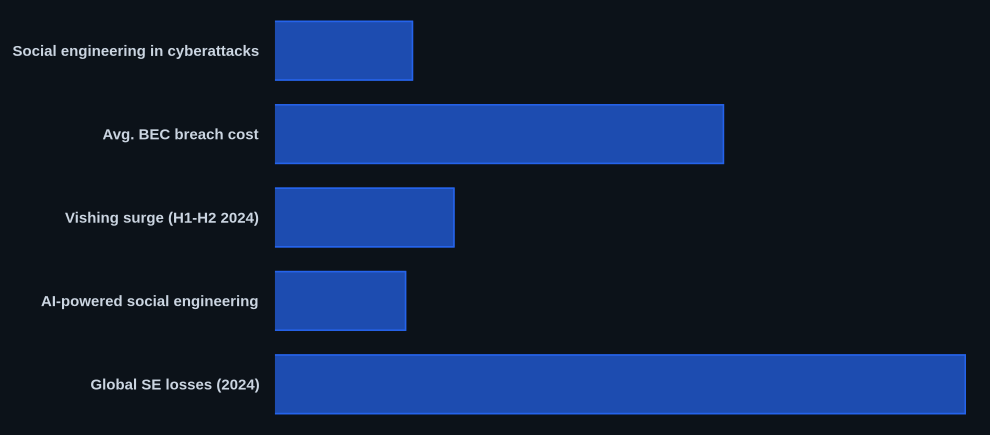
Data at a Glance
| Metric | Value | Source |
|---|---|---|
| Social engineering in cyberattacks | 98% | CVEDaily.com |
| Avg. BEC breach cost | $4.89 million | CVEDaily.com |
| Vishing surge (H1-H2 2024) | 442% | CVEDaily.com |
| AI-powered social engineering | Over 80% | CVEDaily.com |
| Global SE losses (2024) | $16.6 billion | CVEDaily.com |
The CVEDaily Take
Too often, security teams focus exclusively on technical controls, overlooking the impact of a 'no-blame' reporting culture on early social engineering detection. We believe empowering employees to report suspicious AI-powered attempts without fear is a harder, yet more critical, defense mechanism than many current technical solutions. How are you measuring the effectiveness of your 'no-blame' culture when it comes to deepfake reporting, specifically after the Arup incident?
Tools & Resources
Effective defense against social engineering relies on a combination of tools across detection, prevention, and incident response.
Detection (EDR/SIEM)
- CrowdStrike Falcon: This EDR platform offers advanced behavioral analytics and AI-driven detection to spot suspicious activities on endpoints, such as unusual process execution or credential access attempts that often follow a social engineering breach. It helps identify T1566 aftermaths quickly.
- Splunk Enterprise Security: A leading SIEM solution that aggregates logs from across your environment, enabling you to correlate events like repeated failed logins (Event ID 4625) with unusual network traffic patterns to detect social engineering indicators.
Prevention (Controls/Hardening)
- YubiKey: A hardware security key that provides phishing-resistant MFA, specifically FIDO2. This is crucial for preventing MFA fatigue (T1110.003) and credential harvesting by requiring physical presence for authentication.
- Cloudflare Zero Trust: Helps secure user access to internal applications without requiring a VPN, enforcing granular access policies based on user identity and device posture. This strengthens boundary protection (NIST SC-7) against compromised credentials.
Incident Response (Forensics/Containment)
- Wireshark: An open-source network protocol analyzer critical for forensic preservation and analysis. It allows security engineers to capture and inspect network traffic, identifying C2 communications or data exfiltration attempts following a social engineering incident.
- DFIR ORC (Open Response & Collection): A free incident response tool that collects critical system information and artifacts from Windows endpoints, aiding in rapid forensic preservation and analysis during the immediate containment phase.
FAQ
Q: How to detect social engineering?
A: Look for unexpected MFA push notifications (reject immediately), unusual urgency in requests for sensitive actions, and anomalous login locations in SIEM alerts. These are high-signal indicators of a potential attack.
Q: How to respond to a social engineering attack?
A: Immediately save all suspicious evidence, notify your IT/security team using an out-of-band channel, and then isolate any compromised systems by disconnecting them from the network.
Q: How to prevent social engineering?
A: Implement continuous, threat-informed employee awareness training with a 'no-blame' reporting culture, and deploy phishing-resistant MFA solutions like FIDO2 (e.g., YubiKey) across all accounts.