Fileless malware accounts for over 50% of advanced attacks, according to reports from vendors like CrowdStrike and SentinelOne, making its detection paramount for security teams. This guide provides IT teams and security engineers with specific, actionable steps to identify these elusive threats, detailing the attack chain, crucial warning signs, a practical response playbook, and effective prevention controls to protect your infrastructure.
How Fileless Malware Works: The Attack Chain
Fileless malware executes directly in memory without dropping traditional files to disk, making it difficult to spot with signature-based defenses. This happens when an attacker uses existing system utilities to compromise a system. These attacks typically unfold in a multi-stage process, using legitimate system utilities for stealth.
1. Initial Access
Attackers often gain entry through spearphishing campaigns (T1189, T1204) that trick users into opening malicious attachments or clicking compromised links. Vulnerable public-facing applications (T1190) also serve as common entry points, allowing attackers to establish an initial foothold.
2. Execution
Once inside, the attackers execute malicious code, often via obfuscated scripts or macros, using legitimate scripting engines like PowerShell (T1059.001), JavaScript (T1059.003), or VBScript (T1059.005). This stage might involve launching system utilities to download further stages directly into memory.
3. Defense Evasion
Attackers use obfuscation (T1027) to hide their true intent. They often use process injection (T1055) to embed their malicious code into trusted processes (e.g., explorer.exe, svchost.exe). Reflective DLL loading allows full-featured malware payloads to execute directly from memory, bypassing disk-based detection. Attackers also heavily use Living Off the Land (LotL) techniques, employing built-in Windows tools like PowerShell, WMI, PsExec, and Rundll32 (T1218) to blend in.
4. Persistence
To survive reboots, attackers establish persistence without writing traditional files. This is commonly achieved by modifying registry run keys (T1547.001), creating WMI Event Subscriptions (T1546.003), or configuring scheduled tasks (T1053.005) that trigger malicious code stored in the registry or as WMI objects.
5. Privilege Escalation
With persistence established, attackers aim for higher privileges. They might exploit software vulnerabilities (T1068) or steal credentials from memory using tools like Mimikatz, often using legitimate administrator accounts (T1078) for broader access.
6. Discovery & Lateral Movement
From their elevated position, attackers conduct reconnaissance (T1083, T1087, T1046) to map the network, identify valuable data, and locate other systems. They then move laterally (T1021, T1563) across the network, often using compromised credentials or exploiting services like RDP or SMB.
7. Command and Control (C2)
A C2 channel (T1071) is established to communicate with external servers, allowing attackers to receive commands, exfiltrate data, and deploy additional modules. These communications often masquerade as normal web traffic over HTTP, HTTPS, or even DNS to avoid detection.
8. Impact
The final stage delivers on the attacker's objective. This could range from data exfiltration (T1486) for espionage, deploying ransomware (T1486, T1490) to encrypt systems, or causing system disruption (T1490).
Fileless Malware Variants and Types
Fileless threats are not a monolithic entity; they manifest in several forms, each distinguished by how it maintains its presence and executes. Understanding these nuances helps tailor your detection strategies.
Memory-Resident Malware
This variant resides entirely in RAM, injected into legitimate processes like explorer.exe or svchost.exe. It often disappears after a system reboot unless a persistence mechanism is in place. Attackers in the SolarWinds supply chain attack (2020/2021) notably used memory-resident implants like TEARDROP and RAINDROP.
Registry-Resident Malware
Instead of files, malicious code or configuration data is stored directly within the Windows Registry. Legitimate processes or scripts, often triggered by Run keys or WMI events, then retrieve and execute this code. This method is a favorite for various backdoors and loaders to evade file-system monitoring.
WMI-Resident Malware
Using Windows Management Instrumentation (WMI), this type stores malicious scripts as WMI objects (permanent event subscriptions or filters). These scripts execute based on specific system events, completely bypassing the file system and making it extremely stealthy. The TrickBot and Emotet botnets have frequently used WMI for persistence and execution in their campaigns.
Reflective DLL Injection
This sophisticated technique loads a Dynamic Link Library (DLL) directly into a process's memory space from an arbitrary memory buffer, rather than loading it from disk. This allows attackers to deliver full-featured malware payloads without ever writing the DLL file to disk, making traditional endpoint detection challenging.
How to Detect Fileless Malware: Warning Signs and IOCs
Detecting fileless malware demands a shift from signature-based scanning to advanced behavioral analysis, memory forensics, and comprehensive logging. We're looking for anomalies in how legitimate tools behave.
Endpoint Indicators
Focus on highly suspicious process and script activity.
- Windows Event ID 4688 (Process Creation): Look for PowerShell,
wscript.exe, orcscript.exespawning with highly encoded commands (e.g.,-EncodedCommand), unusually long command lines (over 255 characters), or parent-child process anomalies (e.g.,word.exespawningpowershell.exe). - Windows Event ID 4656/4663 (Object Access): Monitor access to critical registry keys like
HKEY_CURRENT_USER\Software\Microsoft\Windows\CurrentVersion\Runor WMI namespaces, especially modifications. - Sysmon Events: Enable and configure Sysmon to capture:
- Event ID 1 (Process Creation): Includes command line and hash, crucial for identifying
powershell.exelaunching with suspicious arguments. - Event ID 7 (Image Loaded): Alerts on suspicious DLLs being loaded, particularly those loaded directly into memory without a corresponding disk file (reflective loading).
- Event ID 8 (CreateRemoteThread): A key indicator for process injection into legitimate processes like
svchost.exeorexplorer.exe. - Event ID 12/13/14 (Registry changes): Essential for detecting registry-based persistence, including WMI event subscription creations.
- Event ID 22 (DNS Query): Helps spot C2 beaconing.
- Event ID 1 (Process Creation): Includes command line and hash, crucial for identifying
- EDR Alert Names: Modern EDR solutions like SentinelOne Falcon will flag "Suspicious PowerShell Execution," "Process Injection Detected," "Registry Persistence Attempt," or "Memory Shellcode Execution." Pay close attention to alerts involving Reflective DLL Loading or WMI Event Subscription creations, as these are high-fidelity indicators.
Network Indicators
Fileless malware eventually needs to communicate, offering a chance for detection.
- Unusual Outbound Traffic: Monitor for connections to rare or non-standard ports, especially from processes that shouldn't be initiating external connections (e.g.,
lsass.exe). - DNS Anomalies: Look for queries to newly observed domains (NODs), domains with low reputation, or a high volume of DNS requests to unusual C2 domains, which may appear benign.
- Encrypted Traffic Anomalies: While traffic is often encrypted, unusual volume, timing, or destination patterns can still signal C2 activity. For instance, the CLOP ransomware activity in the MOVEit Transfer exploitation (2023) often involved unusual network traffic patterns for data exfiltration, the company claims.
SIEM Detection
Centralize your logs and build rules.
- PowerShell Script Block Logging: Enable and ingest Event ID 4104 (PowerShell Script Block Logging) into your SIEM. This captures the actual content of scripts executed, even when obfuscated.
- Sample Splunk Query:
index=* sourcetype="WinEventLog:Microsoft-Windows-PowerShell/Operational" EventCode=4104 | rex "ScriptBlockText=(?<script_content>.*)" | where match(script_content, "(?i)iex|invoke-expression|frombase64string|invoke-webrequest|invoke-restmethod")
- Sample Splunk Query:
- Sysmon Rule for Process Injection: Implement rules in your SIEM to alert on Sysmon Event ID 8 (CreateRemoteThread) where Source and TargetImage aren't aligned to expected behavior.
Response Playbook: What to Do When Fileless Malware Hits
When fileless malware strikes, speed and precision are critical. You're racing against an invisible clock. Don't waste time looking for files that aren't there.
Phase 1: Immediate Containment (first 15 minutes)
Your primary goal is to stop the spread and minimize damage.
- Network Isolation: Immediately isolate the affected endpoint or server. Don't power it down yet. Disconnect it from the network physically or via firewall rules, ensuring it can't communicate internally or externally, especially with potential C2 servers.
- Disable Compromised Accounts: Identify and disable or reset credentials for any user accounts that appear compromised or were used for lateral movement (T1078).
- Terminate Malicious Processes: Use Task Manager or tools like Sysinternals Process Explorer to identify and terminate any suspicious processes, particularly those with anomalous parent-child relationships or high resource usage tied to scripting engines.
- Block C2 Communications: Implement temporary blocks at your firewall or proxy for any identified C2 IP addresses or domains. This prevents further command execution and data exfiltration.
Phase 2: Forensic Preservation
Before remediation, you need to collect volatile data that will disappear.
- Acquire Memory Dumps: The most critical step. Use tools like FTK Imager or DumpIt to take a full memory dump of the affected system immediately. Fileless malware lives in RAM; this is your best chance to capture its code and artifacts.
- Collect Relevant Logs: Export all Windows Event Logs (Security, System, PowerShell Operational, Sysmon), EDR/SIEM logs, and network device logs. Centralized logging is invaluable here.
- Dump Registry Hives: Export relevant registry hives, particularly
SOFTWAREandNTUSER.DAT, which may contain persistence mechanisms or configuration data. - Create Event Timelines: Correlate timestamps from all collected logs to build a precise timeline of the attack, identifying initial access, execution, and subsequent actions.
Phase 3: Recovery and Hardening
Once data is preserved, you can begin the eradication and fortification process.
- Eradication (Reimaging): The safest approach for truly compromised systems. Reimage affected systems from trusted, clean backups. Don't just try to "clean" a system that hosted fileless malware, as its persistence can be deeply hidden.
- Validation: After reimaging, validate that no persistence mechanisms remain and that systems are clean. Conduct vulnerability scans and integrity checks.
- Hardening: Implement comprehensive hardening measures. This includes enforcing PowerShell hardening policies (Constrained Language Mode, Script Block Logging), enabling Windows Defender Exploit Guard (ASR rules), and disabling WMI/DCOM for non-administrative users.
- Restoration: Restore data from clean backups, ensuring data integrity. Veeam Backup & Replication is a strong option for maintaining immutable backups and orchestrating recovery processes quickly and reliably.
- Enhanced Monitoring: Place compromised or targeted systems under enhanced monitoring after recovery, looking for any lingering or renewed suspicious activity.
How to Prevent Fileless Malware: Controls That Work
Preventing fileless malware requires a layered defense strategy that targets execution, persistence, and lateral movement. It's about denying attackers the tools they need to operate silently.
Endpoint Controls
Focus on restricting legitimate system utilities from being abused.
- Application Whitelisting (NIST SC-3, CM-7, MITRE T1059.001, T1059.003, T1059.005, T1204.002): Implement Windows Defender Application Control (WDAC) or AppLocker policies to prevent unauthorized code execution, specifically blocking PowerShell,
wscript.exe, orcscript.exefrom running unsigned scripts or those from untrusted locations. This directly addresses initial execution. - Strong Configuration Management (NIST CM-6, MITRE T1053): Harden PowerShell by setting
Set-ExecutionPolicy AllSigned, enabling Script Block Logging (Event ID 4104), and deploying Constrained Language Mode. Disable PowerShell remoting where not explicitly needed. Disable macros by default in Office applications. Disable legacy features like SMBv1, reducing potential attack vectors. - Endpoint Detection and Response (EDR) (NIST SI-4, AU-6, MITRE T1055, T1071): Deploy and configure EDR solutions that offer behavioral analysis, memory introspection, and PowerShell script-block logging. These tools are critical for identifying process injection, suspicious command-line executions, and C2 communications.
- Malicious Code Protection (NIST SI-3, MITRE T1027): Configure Windows Defender Exploit Guard Attack Surface Reduction (ASR) rules to block obfuscated scripts, prevent Office applications from creating child processes, and block untrusted and unsigned processes.
Access and Network Controls
Limit an attacker's ability to move and elevate privileges.
- Principle of Least Privilege (NIST AC-6, MITRE T1078): Implement strict least privilege for all users and processes. Restrict administrative rights and ensure service accounts have only the necessary permissions. This limits the damage a compromised account can inflict.
- Network Segmentation (NIST SC-7, MITRE T1021.001): Segment your network to restrict lateral movement. Implement strict firewall rules between network zones, limiting what systems can communicate with each other. This contains breaches to smaller areas.
- Regular Patch Management (NIST SI-2, MITRE T1068): Promptly apply security patches to operating systems, applications, and firmware to close known vulnerabilities that attackers exploit for initial access or privilege escalation. The CVE-2023-34362 in MOVEit Transfer makes clear the need to patch quickly.
Monitoring and Awareness
You can't defend against what you don't see.
- Logging and Monitoring (NIST AU-2, AU-6, SI-4, CA-7, MITRE T1070): Enable comprehensive logging, including PowerShell Script Block Logging (Event ID 4104), Sysmon, and Windows Event ID 4688. Centralize these logs in a SIEM for correlation and analysis. Regular review of these logs is crucial.
- Security Awareness Training (NIST AT-2, MITRE T1204.002): Educate users on identifying phishing emails, suspicious links, and social engineering tactics. A well-trained user base is your first line of defense against initial access.
Real-World Incidents
Fileless malware isn't theoretical; it's a significant component in some of the most impactful cyberattacks of recent years, demonstrating its efficacy and stealth.
MOVEit Transfer Vulnerability Exploitation (2023)
The CLOP ransomware group exploited a SQL injection vulnerability, CVE-2023-34362 (CVSS 9.8 Critical), in Progress Software's MOVEit Transfer application. This incident, impacting thousands of organizations globally, including government agencies and financial institutions, was notable for its use of fileless techniques. After initial access, attackers frequently used web shells that resided in memory or used legitimate utilities for reconnaissance, lateral movement, and data exfiltration, without dropping traditional malware to disk. The group claims estimated damages from this campaign are in the hundreds of millions of dollars, with 83 million individuals affected by data breaches in the U.S. alone. TechTarget reports on the estimated impact. Detection primarily relied on network traffic analysis for unusual data exfiltration patterns and meticulous post-exploitation forensics on compromised web servers.
- Lesson: Overlooking ephemeral artifacts and focusing solely on disk-based IOCs allows sophisticated attackers to operate undetected within public-facing applications.
SolarWinds Supply Chain Attack (2020/2021)
The SolarWinds supply chain attack, attributed to the nation-state threat actor UNC2452 (also known as Nobelium), represents one of the most sophisticated cyber espionage campaigns. After attackers compromised the SolarWinds Orion software update mechanism, they deployed a backdoor, SUNBURST. Post-exploitation, UNC2452 extensively used fileless techniques, including memory-resident malware like TEARDROP and RAINDROP, for reconnaissance, lateral movement, and persistent access to victim networks. These tools operated entirely in RAM, making their discovery extremely difficult without deep memory forensics. Microsoft reported the attack impacted numerous U.S. government agencies and Fortune 500 companies; the full financial loss is estimated in the billions of dollars, though this has not been independently verified. FireEye discovered the breach through suspicious MFA activity, which then led to meticulous forensic analysis and correlation of EDR telemetry to uncover the fileless components.
- Lesson: An over-reliance on traditional endpoint detection, without memory forensics and behavioral analysis, leaves a blind spot for nation-state actors using fileless techniques.
TrickBot/Emotet (Ongoing, significant activity in 2024)
The TrickBot and Emotet botnets, continuously evolving, have consistently incorporated fileless techniques into their post-exploitation modules. After initial infection (often via phishing), these malware families frequently use PowerShell and WMI for credential harvesting, persistence, and lateral movement. For instance, TrickBot has been observed using PowerShell to inject code into legitimate processes or to create WMI permanent event subscriptions for persistence without writing executables to disk. Emotet also uses similar techniques to fetch and execute secondary payloads directly into memory. These campaigns have targeted a broad spectrum of global industries, resulting in significant financial losses from ransomware deployment and banking fraud. In Q1 2024, Emotet activity saw a resurgence with new obfuscation techniques, leading to successful infections across Europe and North America, CISA reports. Detection often occurs through EDR solutions flagging suspicious PowerShell execution patterns, anomalous network C2 traffic, and user reports of suspicious email activity.
- Lesson: Even commodity malware families adopt fileless methods, underscoring the need for strong behavioral detection and script block logging across all endpoints, not just for "advanced" threats.
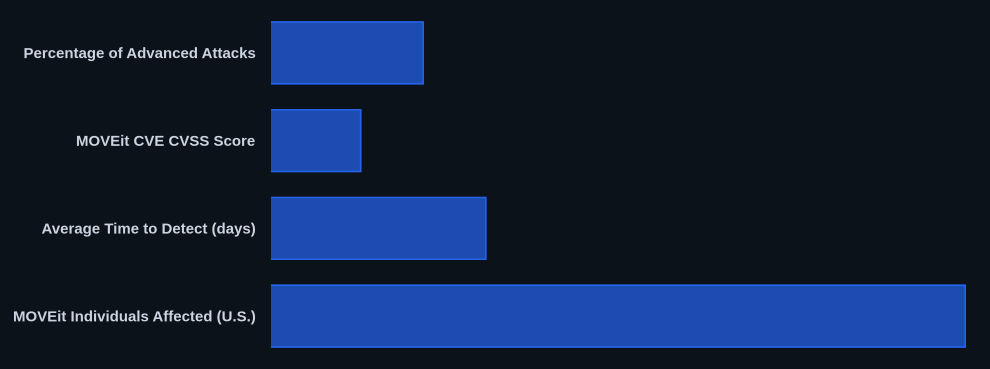
Data at a Glance
| Metric | Value | Source |
|---|---|---|
| Percentage of Advanced Attacks | Over 50% | CrowdStrike/SentinelOne reports |
| MOVEit CVE CVSS Score | 9.8 (Critical) | NIST NVD |
| Average Time to Detect (days) | 277 days for critical infrastructure IBM | IBM Cost of a Data Breach Report 2023 |
| MOVEit Individuals Affected (U.S.) | 83 million | TechTarget |
| YoY Trend (2022-2023) | +35% increase in attacks targeting APIs Akamai | Akamai State of the Internet Report Q1 2023 |
The CVEDaily Take
Too many security teams treat PowerShell script block logging as a "nice to have" rather than an absolutely essential control. It's often the single best telemetry source for fileless execution, yet we frequently see it misconfigured or completely disabled. We think the overselling of basic EDRs without emphasizing deep memory forensics also creates a false sense of security.
If you're not capturing PowerShell Event ID 4104 and Sysmon Event ID 8, how confident are you that your endpoints aren't currently hosting memory-resident malware?
Tools & Resources
Effective defense against fileless malware relies on a combination of strong logging, advanced endpoint protection, and specialized forensic capabilities.
Detection (EDR/SIEM)
- SentinelOne Falcon: Offers behavioral AI, memory-based detection, and PowerShell script analysis to identify fileless threats. Its deep visibility into process activity helps flag malicious actions without relying on file signatures.
- Microsoft Defender for Endpoint: Provides strong endpoint detection and response capabilities, including memory scanning and attack surface reduction rules to block common fileless techniques. Its integration with other Microsoft security products offers a unified view.
- Splunk Enterprise Security (ES): A SIEM solution that aggregates logs from endpoints, networks, and applications. Essential for correlating PowerShell Script Block Logging, Sysmon events, and network traffic to detect multi-stage fileless attacks.
Prevention (Controls/Hardening)
- Windows Defender Application Control (WDAC): Allows you to specify which drivers and applications are allowed to run on your Windows clients and servers. Crucial for application whitelisting against unauthorized script execution.
- Group Policy Management Editor: Essential for configuring PowerShell hardening, enabling advanced audit policies, and deploying security settings across your domain.
Incident Response (Forensics/Containment)
- Volatility Framework: An open-source memory forensics framework for extracting digital artifacts from volatile memory (RAM) samples. Indispensable for analyzing memory dumps to uncover fileless malware.
- FTK Imager: A free data preview and imaging tool that lets you acquire forensic images of local drives and memory dumps. Vital for preserving the integrity of evidence during incident response.
- Sysinternals Suite: A collection of technical tools for monitoring, managing, and troubleshooting the Windows operating system, including Process Explorer, Autoruns, and Process Monitor. Excellent for live response and deeper endpoint analysis.
FAQ
-
Q: How to detect fileless malware?
A: Focus on endpoint behavioral anomalies: enable PowerShell Script Block Logging (Event ID 4104) to capture actual script content, monitor Sysmon Event ID 8 for process injection attempts, and look for unusual outbound network connections from scripting engines. -
Q: How to respond to a fileless malware attack?
A: Immediately isolate the affected system from the network, disable any compromised user accounts, and terminate suspicious processes. After containment, take a full memory dump for forensic analysis before reimaging. -
Q: How to prevent fileless malware?
A: Implement application whitelisting (WDAC) to prevent unauthorized code execution and enforce strong PowerShell hardening configurations, including Constrained Language Mode and Script Block Logging.