How to Detect Brute Force Attack: Attack Chain, Warning Signs & Defense Playbook (2026)
A successful brute force attack often comes down to correlating a sudden spike in Event ID 4624 (Audit Success) immediately following numerous Event ID 4625 (Audit Failure) events from the same source IP, indicating a successful credential compromise, not just an ongoing attempt. This guide provides security engineers with the specific warning signs, a practical response playbook, and concrete prevention controls to counter these persistent threats in 2026.
How Brute Force Attack Works: The Attack Chain
A brute force attack is a systematic, trial-and-error approach to gain unauthorized access. Attackers automate this process, targeting authentication services like Remote Desktop Protocol (RDP) or Secure Shell (SSH).
Here's how these attacks typically unfold:
1. Reconnaissance and Target Identification (MITRE ATT&CK T1595.002)
Attackers first identify accessible services and potential target accounts. This often involves scanning for open ports like 3389 (RDP) or 22 (SSH) on internet-facing systems. They might also harvest usernames from public sources or previous breaches.
2. Initial Access Attempt (MITRE ATT&CK T1110)
With targets identified, automated tools like Hydra or Medusa begin systematically attempting login combinations. They might start with common username/password pairs against exposed services. This phase generates a high volume of failed login attempts.
3. Credential Compromise (MITRE ATT&CK T1110.001)
Eventually, a correct credential pair is found. This triggers a successful login event, often after hundreds or thousands of failures. This is the critical pivot point that often gets missed, as security teams sometimes focus solely on the failures. The attacker now possesses valid credentials.
4. Persistence and Lateral Movement (MITRE ATT&CK T1078, MITRE ATT&CK T1021)
Once inside, attackers establish persistence, potentially by creating new user accounts or installing backdoors. They then use the compromised credentials for lateral movement within the network, escalating privileges, and accessing additional systems. Tools like PsExec or Mimikatz facilitate this post-compromise activity.
5. Impact and Data Exfiltration (MITRE ATT&CK T1041, MITRE ATT&CK T1486)
The ultimate goal varies, from data exfiltration to deploying ransomware. The initial brute force attack is merely the entry point, enabling more destructive actions. The $4.45 million average cost of a data breach in 2023 often stems from this initial credential compromise, according to IBM.
Brute Force Attack Variants and Types
Brute force isn't a monolithic attack; attackers employ several sophisticated variants. Knowing these helps refine your detection strategies.
Dictionary Attack
This variant uses pre-compiled lists of common usernames and passwords, like those found in publicly available dictionaries. It's faster than simple brute force as it doesn't try every combination. The Lapsus$ group has been known to use variations of these attacks combined with social engineering to gain initial access.
Credential Stuffing
Attackers use leaked username/password pairs from previous data breaches, assuming credential reuse. This is highly effective because users often recycle credentials across multiple services. Akamai reported a 40% year-over-year increase in credential stuffing attacks in 2023.
Reverse Brute Force
Instead of trying many passwords against one username, this technique tries a single, very common password (e.g., "Password123!") against a large list of usernames. The goal is to find any account using that weak, common password.
Hybrid Brute Force
This method combines dictionary attacks with a limited brute force component, appending or prepending numbers and symbols to dictionary words. It balances speed with increased success rates against slightly stronger passwords.
How to Detect Brute Force Attack: Warning Signs and IOCs
Effective brute force detection relies on correlating multiple signals, moving beyond simple login failures to identify successful compromises.
Endpoint Indicators
Monitor Windows Event Logs vigilantly for specific IDs that tell a story. A high volume of Event ID 4625 (An account failed to log on) from a single source IP targeting multiple user accounts, or many attempts against one account, is a primary indicator. Critically, watch for Event ID 4624 (An account was successfully logged on) immediately following a flurry of 4625 events from the same source IP or workstation. This often signals a successful brute force. Also, look for Event ID 4776 (The domain controller failed to validate the credentials for an account), indicating authentication failures against domain controllers, and Event ID 4740 (A user account was locked out), which can signal automated attempts hitting lockout thresholds. CrowdStrike Falcon and SentinelOne often flag these with alerts like "Multiple Failed Logon Attempts" or "Suspicious RDP Login Activity."
Network Indicators
Observe network traffic for anomalies on common authentication ports. A high volume of connections on RDP-3389, SSH-22, SMB-139/445, or HTTP/S-80/443 originating from unusual geographical locations or known malicious IP addresses should trigger an alert. Look for repeated failed connection attempts and unusual, rapidly changing User-Agent strings in web application logs, which can indicate automated brute force tools. A sudden spike in outbound authentication traffic, especially to unusual destinations, might suggest post-compromise activity.
SIEM Detection
Your Security Information and Event Management (SIEM) system, like Splunk or Microsoft Sentinel, is crucial for correlating these events. Implement rules that track the frequency of Event ID 4625 from a single source IP over a short time window (e.g., >50 failures in 5 minutes). More advanced rules should look for a successful login (Event ID 4624) within 60 seconds of multiple Event ID 4625 events from the same source IP and target username. You'll also want rules for password spraying (a single password against many accounts) or distributed brute force (many IPs to one account), as well as geographical login anomalies.
# Splunk-like query for 4625 followed by 4624 from same source
index=wineventlog EventCode=4625 OR EventCode=4624
| rex field=Message "Source Network Address:\s(?<SourceIP>\d{1,3}\.\d{1,3}\.\d{1,3}\.\d{1,3})"
| rex field=Message "Account Name:\s(?<TargetAccount>[^\\n]+)"
| transaction SourceIP TargetAccount maxspan=10m startswith="EventCode=4625" endswith="EventCode=4624"
| where _eventcount > 1
Response Playbook: What to Do When Brute Force Attack Hits
When a brute force attack is confirmed, swift and decisive action is paramount to contain the threat and minimize impact. Don't hesitate.
Phase 1: Immediate Containment (first 15 minutes)
- Isolate Affected Accounts: Immediately lock out any accounts showing successful logins after numerous failures. Force a password reset for these accounts, ensuring they can't be reused by the attacker.
- Block Attacker IPs: Use your firewalls, Web Application Firewalls (WAFs), or network access control lists to block the source IP addresses identified in the high-volume failed and successful login attempts. Consider temporary geographical IP filtering if the source is from an unexpected region.
- Disable Targeted Services (if critical): If the attack is severe and ongoing, consider temporarily disabling the targeted authentication service (e.g., RDP, SSH) from external access. Prioritize critical systems and services.
Phase 2: Forensic Preservation
- Capture System and Network Logs: Export all relevant logs from your SIEM, EDR (CrowdStrike Falcon, SentinelOne), domain controllers (especially Event IDs 4624, 4625, 4776, 4740), and network devices (firewalls, routers).
- Disk and Memory Imaging: For any systems where a successful login was detected, perform disk images and memory captures. This preserves potential malware, tools, or evidence of lateral movement before remediation.
- Maintain Chain of Custody: Document every step of your forensic collection process. This ensures the evidence remains admissible for potential legal action or internal reviews.
Phase 3: Recovery and Hardening
- Eradicate Threat: Ensure all attacker access points are closed, any backdoors removed, and compromised credentials are reset with strong, unique passwords. Scan for and remove any malware deployed.
- Restore from Backups: If systems were compromised or data exfiltrated, restore from known good backups. Verify integrity before bringing systems back online.
- Implement Stronger Controls: Conduct a thorough post-incident review. Prioritize enabling MFA for all accounts, especially those with remote access, harden authentication services (e.g., Network Level Authentication for RDP), and implement rate limiting on all login pages. Consider rotating service account passwords quarterly.
How to Prevent Brute Force Attack: Controls That Work
Preventing brute force attacks requires a layered approach, integrating strong policies, technical controls, and continuous monitoring.
Authentication & Access Control
Implement Multi-Factor Authentication (MFA) for all remote access, administrative accounts, and critical systems (NIST IA-2 Identification and Authentication (Organizational Users), MITRE ATT&CK T1078, T1133). Solutions like YubiKey provide hardware-based MFA, significantly hardening login security against credential compromise. Enforce strong, unique password policies, requiring minimum length, complexity, and disallowing common patterns (NIST IA-5 Authenticator Management). Regularly disable or remove inactive accounts to reduce the attack surface (NIST AC-2 Account Management). Implement account lockout mechanisms after a set number of failed attempts (NIST AC-2 Account Management).
System Hardening & Configuration
Harden configurations for exposed services. For RDP, enforce Network Level Authentication (NLA), restrict access to specific source IP ranges via firewalls (NIST SC-7 Boundary Protection), and consider changing the default listening port. For SSH, mandate key-based authentication, disable root login, and use tools like fail2ban to automatically block IPs with repeated failed attempts (NIST CM-6 Configuration Settings, CM-7 Least Functionality). On web applications, deploy CAPTCHAs on login pages and implement strong session management (MITRE ATT&CK T1562.001).
Logging & Monitoring
Centralize all audit logs to a SIEM for real-time analysis and long-term storage (NIST AU-2 Event Logging). Implement continuous monitoring for unusual login patterns, account lockouts, and successful logins after multiple failures (NIST SI-4 System Monitoring, AU-6 Audit Record Review Analysis and Reporting). This proactive monitoring is key to detecting attacks before they escalate.
Network Protection
Restrict network access to authentication services (e.g., RDP, SSH) using network firewalls or security groups (NIST SC-7 Boundary Protection). Implement rate limiting at the network edge or via a WAF to throttle the number of authentication attempts from a single source IP over a defined period (MITRE ATT&CK T1190). This makes brute force attempts significantly slower and more detectable.
Real-World Incidents
Examining recent incidents highlights the persistent threat of brute force attacks and the cascading impact of initial credential compromise.
Mailchimp (2022)
In early 2022, email marketing giant Mailchimp suffered a targeted brute force attack. Attackers successfully compromised internal employee accounts, specifically those involved in client support and account administration. This breach wasn't about directly attacking Mailchimp's customer authentication but rather its internal systems. Once inside, the attackers claim to have gained access to internal tools and customer data, including audience data and API keys for a subset of customers; Mailchimp has confirmed internal system access but not the specific data types stolen. This initial access then facilitated subsequent, highly targeted phishing and cryptocurrency scams against Mailchimp's customers. The incident underscored the critical importance of strong MFA and endpoint security for internal corporate accounts, even those seemingly non-public. A failure to detect the brute force against employee credentials allowed the broader compromise.
Okta (2022)
The identity and access management provider Okta experienced a breach in January 2022, which came to light in March, when the Lapsus$ group published screenshots claiming to show their internal systems. Okta confirmed that the initial access was facilitated through the compromise of a third-party vendor's employee laptop. While not a direct brute force against Okta's primary services, the methods used by Lapsus$ often include social engineering to gain initial access, followed by techniques like brute-forcing or credential stuffing against VPNs or virtual desktop infrastructure, often bypassing weak MFA implementations. Lapsus$ claimed this attack affected over 15,000 Okta customers; Okta stated that only a small percentage of customers (approximately 2.5%) were potentially impacted. This incident demonstrated how a supply chain compromise, even through a contractor, can lead to widespread impact when initial access is gained through credential compromise. The lesson here is that an organization's security is only as strong as its weakest link, including vendors, and that sophisticated attackers combine techniques to circumvent traditional authentication.
Electronic Arts (EA) (2021)
In June 2021, game developer Electronic Arts (EA) was breached, leading to the theft of what attackers claimed was 780 GB of data, including source code for popular games like FIFA 21. EA confirmed the breach and data theft but has not publicly confirmed the exact volume or type of all data exfiltrated. The attackers leveraged a combination of social engineering and brute force. They first purchased stolen session cookies for an internal Slack account on the dark web. When this didn't provide sufficient access, they used social engineering against an EA employee to gain access to a corporate Slack channel. From there, they used brute force or password guessing to gain access to other internal tools and repositories. This incident highlights that initial access often isn't a single technique but a chain, where credential compromise (via stolen cookies or brute force) enables further exploitation. The failure was in detecting the initial compromise of internal accounts and not having adequate MFA or access controls on internal tools, allowing the brute force aspect to succeed.
Data at a Glance
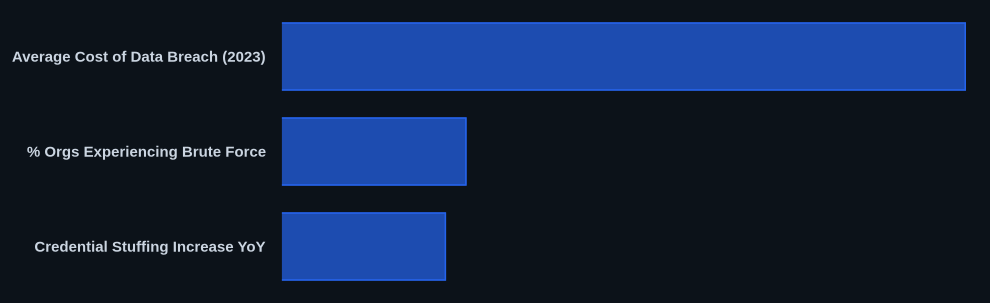
| Metric | Value | Source |
|---|---|---|
| Average Cost of Data Breach (2023) | $4.45 million | IBM |
| % Orgs Experiencing Brute Force | Over 60% per month | CrowdStrike |
| RDP/SSH Target Prevalence | Most targeted services | CSO Online |
| Credential Stuffing Increase YoY | Over 40% in 2023 | Akamai |
| MFA Bypass Trend | MFA bypasses on the rise | KrebsOnSecurity |
The CVEDaily Take
We often see security teams over-index on flagging mass Event ID 4625 failures but miss the more critical indicator: the single, successful Event ID 4624 that immediately follows a torrent of failures from the same source. This post-failure success is the smoking gun of a successful brute force, yet it frequently gets lost in the noise of countless login attempts. While MFA is paramount, we need to shift our detection focus to the subtle shifts in login behavior that signal compromise, not just the attempts. How many of your monitoring rules actively correlate a burst of failures with a subsequent success from a specific IP, rather than just alerting on failure thresholds alone?
Tools & Resources
Using the right tools is essential for both detecting and preventing brute force attacks.
Detection (EDR/SIEM)
- CrowdStrike Falcon: This EDR solution offers real-time visibility into endpoint activity, detecting "Multiple Failed Logon Attempts" and "Suspicious RDP Login Activity" alerts, often correlating behavior before it escalates. CrowdStrike Falcon Documentation
- Splunk Enterprise Security: A leading SIEM platform, Splunk excels at ingesting vast amounts of log data and running correlation rules to identify patterns like sequential Event ID 4625 and 4624 from a single source. Splunk Enterprise Security Documentation
Prevention (Controls/Hardening)
- YubiKey: These hardware security keys provide phishing-resistant MFA using FIDO2/WebAuthn, significantly mitigating the impact of even successful credential brute force attempts. YubiKey Product Page
- Cloudflare Zero Trust: This platform helps restrict network access to sensitive applications and services, preventing direct exposure to the internet and forcing all access through identity-aware proxies, thwarting many brute force attempts at the edge. Cloudflare Zero Trust Documentation
- fail2ban: An intrusion prevention framework that scans log files (e.g., SSH, RDP logs) and automatically bans IP addresses showing malicious signs, like too many password failures. fail2ban GitHub Repository
Incident Response (Forensics/Containment)
- Autopsy: A free, open-source digital forensics platform that helps in analyzing disk images, extracting artifacts, and uncovering evidence of compromise during the forensic preservation phase. Autopsy Website
FAQ
Q: How to detect brute force attack?
A: Focus on correlating a high volume of Event ID 4625 (Audit Failure) events followed by an Event ID 4624 (Audit Success) from the same source IP, indicating a successful compromise. Also, monitor for spikes in account lockouts (Event ID 4740) and unusual login patterns from suspicious geographic locations on ports like RDP-3389 or SSH-22.
Q: How to respond to a brute force attack?
A: Immediately lock out affected accounts and force password resets. Block the attacker's source IP addresses at your firewall or WAF. If the attack is ongoing and severe, temporarily disable the targeted service from external access to contain the threat.
Q: How to prevent brute force attack?
A: Implement Multi-Factor Authentication (MFA) for all remote and administrative access. Enforce strong, unique password policies and use rate limiting on all login interfaces to throttle authentication attempts.