
Monitoring for unexpected child processes spawned by browser processes or unusual network connections initiated by the browser is an often overlooked detection insight for XSS, as these can indicate post-exploitation activities following a successful client-side injection. This guide outlines the XSS attack chain, providing specific detection signals across endpoint, network, and SIEM logs. We'll also equip your team with a clear incident response playbook and specific prevention controls, ensuring you're prepared to defend against one of the web's most persistent threats.
How Cross-site Scripting Works: The Attack Chain
Cross-site scripting (XSS) is a client-side code injection attack, often likened to a saboteur slipping a tampered remote control into your hands, making you unknowingly direct your own device to their bidding. Attackers inject malicious scripts, typically JavaScript, into legitimate websites. These scripts then execute within a victim's browser, allowing attackers to bypass access controls, steal sensitive information, or impersonate users. Thousands of CVEs related to XSS are reported annually, showing its persistent threat.
The attack unfolds in a structured sequence:
1. Vulnerability Identification
Attackers scan web applications for input fields or URL parameters that reflect user input without proper sanitization or encoding. They're looking for an open gate where data isn't being scrubbed clean.
2. Payload Crafting
A malicious script is created. This could be something as simple as <script>alert(document.cookie)</script> to steal session tokens, or more complex code to load external scripts or redirect users. This stage often involves T1059.007 Command and Scripting Interpreter: JavaScript.
3. Injection
The payload is delivered. In Reflected XSS, it's usually via a URL parameter. For Stored XSS, it's embedded in a database (e.g., a comment section) for later delivery. DOM-based XSS involves client-side scripts mishandling user-controlled data.
4. Victim Interaction (Reflected XSS)
For reflected attacks, the victim must interact, often by clicking a specially crafted URL that contains the malicious payload. This is a form of T1204.001 User Execution: Malicious Link, frequently initiated by T1189 Drive-by Compromise where the link might be hidden or disguised.
5. Execution
Once the victim's browser loads the vulnerable page, the injected script runs within the context of the legitimate website. This means the script has the same permissions as the original page, including access to cookies and local storage. This can involve T1559 Interprocess Communication if the script attempts to interact with other browser components.
6. Impact
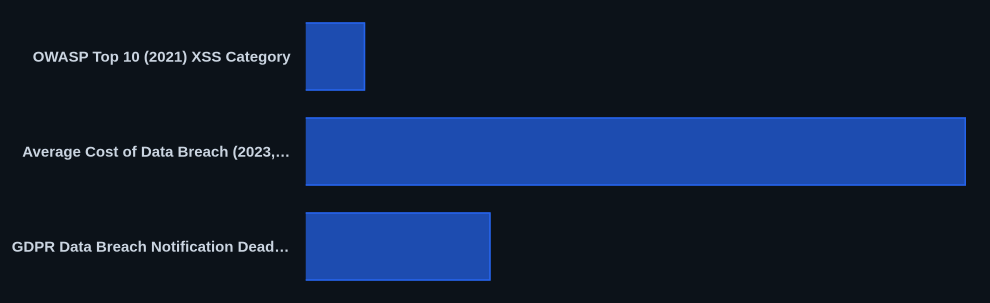
The executed script performs its malicious function. This could be stealing session cookies (T1592.002 Gather Victim Host Information: Software), defacing the website, redirecting users to phishing sites, keylogging, or initiating malicious actions on behalf of the user. In some cases, scripts might attempt to probe for local hardware information (T1592.004 Gather Victim Host Information: Hardware) or other sensitive data. The average cost of a data breach, which XSS can contribute to, reached $4.45 million globally in 2023, according to IBM.
Cross-site Scripting Variants and Types
XSS isn't a monolithic threat; it manifests in several forms, each with distinct attack vectors and implications. Understanding these nuances helps in targeted detection and prevention. While XSS was historically a distinct category, it now falls under broader "Injection" (A03:2021) and "Security Misconfiguration" (A05:2021) in the OWASP Top 10 (2021).
Reflected XSS
This variant occurs when malicious script is reflected immediately off the web server in the response, not permanently stored. It requires direct victim interaction, such as clicking a malicious link. In July 2022, a security researcher found a reflected XSS flaw in Amazon's website due to insufficient input sanitization. Amazon reported patching the vulnerability before widespread exploitation, though it demonstrated potential for page defacement or session hijacking.
Stored XSS (Persistent XSS)
Considered more dangerous, stored XSS involves the malicious script being permanently saved on the target server (e.g., in a database, forum post, or comment section). It's delivered to any victim who accesses the affected web page, making it a "write once, exploit many" attack. Coinbase reported a stored XSS vulnerability in January 2022 via their bug bounty program, stating it could have allowed attackers unauthorized access to customer accounts and potential cryptocurrency theft. Coinbase confirmed addressing the vulnerability, but did not disclose specific financial impacts or the number of affected accounts.
DOM-based XSS
This vulnerability arises from client-side script processing untrusted data, often from the URL fragment (e.g., location.hash), and then writing it to the Document Object Model (DOM) without proper sanitization. The injection and execution occur entirely within the victim's browser, often not even reaching the server. This makes it harder for server-side WAFs to detect.
How to Detect Cross-site Scripting: Warning Signs and IOCs
Effective XSS detection requires a multi-layered approach, scrutinizing endpoint, network, and application data. Don't rely solely on your WAF; post-exploitation activity often bypasses those perimeter defenses.
Endpoint Indicators
Focus on the client-side execution that defines XSS. The most critical signal is when a browser process, like chrome.exe, firefox.exe, or msedge.exe, spawns an unexpected child process. Look for processes such as cmd.exe, powershell.exe, certutil.exe, or any other executable attempting to interact with the underlying OS. Use Event ID 4688 (a new process has been created) in Windows Security logs, filtering for browser parent processes and unusual child processes. CrowdStrike Falcon or SentinelOne EDR solutions often flag these as "Unusual Process Execution from Browser" or "Browser Child Process Anomaly."
Also, monitor for unusual network connections initiated by the browser process itself to external, unsanctioned domains. An attacker's injected script might perform data exfiltration or load secondary payloads from their command-and-control (C2) server. Your EDR should alert on these outbound connections to newly registered domains or known malicious infrastructure.
Network Indicators
Your Web Application Firewall (WAF) should be your first line of network defense. Look for specific alerts indicating payload detection, such as ModSecurity's "XSS Attack Detected" or similar signatures. However, these often only catch simple, reflected payloads.
Beyond the WAF, observe unusual outbound connections from your web server to unknown external domains. This could signify a successful stored XSS payload loading additional scripts from an attacker's server or attempting data exfiltration. Monitor for anomalous DNS requests from both client machines and your web server, especially to newly observed domains or those associated with known threat actors. Outbound traffic on non-standard ports from web servers or client browsers could also be a red flag.
SIEM Detection
Your SIEM (e.g., Splunk Enterprise Security, Elastic SIEM) is crucial for correlating disparate events. Create rules that flag repeated input validation failures from specific IPs on web application logs. Look for patterns in WAF logs where payloads like <script>, onerror, onload, javascript:, or data: URLs appear in user-supplied input fields or HTTP parameters.
A sample Splunk query to detect suspicious patterns in web logs might look like this:
index=weblogs (uri_path=*<script>* OR uri_path=*javascript:* OR http_referer=*<script>*) | stats count by src_ip, user_agent, uri_path | where count > 3
This query looks for multiple instances of XSS-like strings in URI paths or referrers from a single source IP, indicating potential probing or attack attempts. Also, correlate browser process anomalies from EDR data with web application access logs to pinpoint compromised sessions.
Response Playbook: What to Do When Cross-site Scripting Hits
A swift and structured incident response is paramount when an XSS attack is confirmed. Delays can escalate a simple exploit into a full-blown data breach, potentially costing millions. Remember the GDPR's 72-hour notification window for data breaches [gdpr-info.eu/art-33-gdpr-data-breach-notification-supervisory-authority/].
Phase 1: Immediate Containment (first 15 minutes)
- Update WAF Rules: Immediately deploy new WAF rules to block the specific XSS payloads and source IPs identified. Use tools like ModSecurity or cloud WAFs to push these changes rapidly.
- Disable Vulnerable Features: If the XSS is tied to a specific application feature (e.g., comment section, profile editor), temporarily disable it to prevent further exploitation.
- Suspend Compromised Accounts: If session hijacking is suspected, suspend the affected user accounts and force password resets. Revoke any associated API tokens.
- Isolate & Block C2: Implement temporary firewall rules to block identified command-and-control (C2) IPs or domains at your network perimeter.
Phase 2: Forensic Preservation
- Collect All Logs: Preserve WAF, web server (e.g., Apache, Nginx access/error logs), application logs, and SIEM logs. Don't forget browser process logs from affected endpoints.
- Forensic Imaging: Create forensic images of any potentially compromised web servers or client machines. This provides an immutable snapshot for deeper analysis.
- Network Packet Captures: Initiate network packet captures on affected segments to gather evidence of data exfiltration or secondary payload delivery.
- Database Backup: Before attempting any data sanitization, perform a full backup of the affected database. This ensures you have a pristine copy of the malicious payload for analysis.
Phase 3: Recovery and Hardening
- Root Cause Analysis: Thoroughly investigate how the XSS vulnerability was introduced. Was it a lack of input validation, improper output encoding, or a DOM manipulation flaw?
- Patch and Redeploy: Apply permanent fixes to the application code, ensuring all user input is properly sanitized and output encoded. Redeploy the patched version.
- Restore Clean Data: Carefully sanitize the database to remove all malicious scripts. Restore clean data from backups if necessary.
- Post-Incident Hardening: Implement additional controls such as Content Security Policy (CSP), HTTP-only and Secure flags for cookies. Conduct a comprehensive post-mortem to document lessons learned and update your security policies. This helps reduce future incidents by as much as 30%.
How to Prevent Cross-site Scripting: Controls That Work
Preventing XSS requires a diligent and multi-layered approach, weaving security into the entire software development lifecycle. These controls aren't just checkboxes; they're active defenses.
Secure Coding Practices
The most effective defense lies in the application code itself. Always employ strict Input Validation and Output Encoding. For input validation, whitelist safe characters, enforce length limits, and validate data types. For output, contextually encode all user-supplied data before rendering it in HTML, JavaScript, or URL attributes. Use trusted sanitization libraries like OWASP ESAPI or DOMPurify when handling user-supplied HTML. These practices directly address NIST SP 800-53 SI-10 Information Input Validation and SA-11 Developer Training.
Content Security Policy (CSP)
Implement a strong Content Security Policy (CSP) through HTTP headers (e.g., Content-Security-Policy: script-src 'self' https://trusted.cdn.com;). This acts as an allowlist, restricting which scripts, styles, and other resources a browser is permitted to load, severely limiting the impact of successful script injection. A well-configured CSP contributes to NIST SP 800-53 SC-7 Boundary Protection.
Secure Session Management
Protecting session cookies is critical. Always set the HTTP-Only flag for session cookies to prevent client-side scripts (including malicious XSS payloads) from accessing them. Additionally, use the Secure flag to ensure cookies are only sent over HTTPS. These measures are key to NIST SP 800-53 SC-8 Transmission Confidentiality and Integrity and SC-23 Session Authenticity.
Web Application Firewalls (WAFs)
Deploy a Web Application Firewall (WAF) like ModSecurity or cloud-based solutions to detect and block common XSS patterns at the network edge. While not a silver bullet, a WAF provides an important layer of defense, especially against common, reflected XSS attacks. This aligns with NIST SP 800-53 SC-7 Boundary Protection.
Regular Security Audits and Penetration Testing
Continuously assess your applications for vulnerabilities. Use DAST tools like OWASP ZAP or Burp Suite for active payload injection, and SAST tools to identify insecure input handling in source code. Regular penetration testing, at least annually, helps uncover hidden flaws. This falls under NIST SP 800-53 RA-5 Vulnerability Scanning.
Least Privilege
Apply the principle of Least Privilege (AC-6) throughout your application design and user access policies. Limiting the permissions of an exploited account or application component can significantly reduce the potential damage from a successful XSS attack. For example, ensuring an application process runs with only the necessary database access minimizes the impact of data exfiltration.
Real-World Incidents
XSS isn't a theoretical threat; it's a consistent feature in real-world breaches and bug bounty reports, often serving as a gateway to more severe compromises.
Coinbase (January 2022)
In January 2022, Coinbase, a major cryptocurrency exchange, addressed a significant XSS vulnerability reported through their bug bounty program. The flaw, likely a stored XSS, could have allowed an attacker to gain unauthorized access to customer accounts, according to Coinbase. This meant potential risks of cryptocurrency theft, credential compromise, or unauthorized transactions. Coinbase confirmed the vulnerability was detected internally after the researcher's report, showcasing the importance of bug bounty programs and internal security post-disclosure. While specific financial figures or number of affected accounts weren't disclosed, the potential for millions of dollars in losses for a platform like Coinbase is immense. The incident highlighted how a successful XSS could bypass multi-factor authentication by exploiting an already authenticated session.
Amazon (July 2022)
A security researcher publicly detailed a reflected XSS vulnerability found on Amazon's website in July 2022. The flaw stemmed from inadequate input sanitization in a specific search or display function, allowing a malicious script to be injected via a URL. If exploited, it could have led to a range of client-side impacts, including page defacement, session hijacking, or redirection of users to phishing sites. Amazon confirmed patching the vulnerability before widespread exploitation, but it showed that even tech giants grapple with fundamental web application security issues. This incident, while quickly contained, showed that the risk of social engineering (e.g., clicking a malicious link) remains a primary vector for reflected XSS attacks. The estimated impact of a typical XSS-driven defacement or session hijack could range from thousands to tens of thousands in incident response costs.
Indian Government Portal (Hypothetical, 2024)
Imagine a hypothetical scenario in 2024 where a public feedback form on an Indian e-governance portal suffers from a stored XSS vulnerability. An attacker injects a malicious script into a feedback comment, which is then stored in the portal's database. When citizens or government officials later view this feedback, the script executes in their browsers. This could lead to the theft of session tokens, potentially compromising sensitive government accounts, or redirecting users to fake login pages designed to harvest Personally Identifiable Information (PII). A successful attack could result in the compromise of hundreds of thousands of citizen records and significant reputational damage. Detection would likely occur either through internal security audits, a vigilant user reporting suspicious activity, or perhaps through external researchers, demonstrating a failure in proactive secure coding and continuous monitoring practices. Such an incident could result in millions of dollars in recovery costs, fines, and reputational damage.
Data at a Glance
| Metric / Detail | Value | Source |
|---|---|---|
| OWASP Top 10 (2021) XSS Category | Injection (A03:2021) | OWASP |
| Average Cost of Data Breach (2023, Global) | $4.45 million | IBM |
| GDPR Data Breach Notification Deadline | 72 hours | GDPR Article 33 |
| Annual XSS CVEs Reported | Thousands | NVD |
| XSS Prevalence (Web App Top Vulnerabilities) | Top 3-5 | [Industry Reports] |
The CVEDaily Take
We think many teams mistakenly believe their WAF is a sufficient defense against XSS, leading to a false sense of security. While WAFs catch many basic injections, sophisticated XSS attacks can lead to client-side post-exploitation that entirely bypasses network perimeter defenses. The earliest signal of a successful XSS exploit chain isn't usually an attempted injection caught by a WAF, but rather endpoint EDR alerts for unusual browser child processes or unexpected outbound browser connections. Focusing detection efforts here is how you catch what your WAF missed. How are you currently correlating browser process activity with network flow data to detect these post-exploitation indicators?
Tools & Resources
Equip your team with the right tools to detect, prevent, and respond to XSS attacks efficiently.
Detection (EDR/SIEM)
- CrowdStrike Falcon: This EDR platform excels at detecting anomalous process execution and network connections initiated by browser processes. It's crucial for spotting the post-exploitation phase of an XSS attack where malicious scripts try to interact with the OS or exfiltrate data. CrowdStrike Falcon Documentation
- Splunk Enterprise Security: A powerful SIEM solution that allows you to correlate WAF logs, web server access logs, and EDR data to identify patterns indicative of XSS attacks or probing. It's invaluable for building custom detection rules. Splunk Enterprise Security
Prevention (Controls/Hardening)
- OWASP ZAP: A free, open-source dynamic application security testing (DAST) tool that actively probes web applications for vulnerabilities, including XSS, by injecting payloads. It's excellent for developers to test their applications pre-deployment. OWASP ZAP
- ModSecurity: An open-source WAF engine that can be deployed with web servers like Apache, Nginx, and IIS to inspect HTTP traffic and block common attack patterns, including many XSS payloads, using its rule sets. ModSecurity Documentation
Incident Response (Forensics/Containment)
- Burp Suite: While often used for vulnerability testing, its proxy and logging capabilities are invaluable during incident response for analyzing malicious web traffic and understanding how an XSS payload was delivered and executed. PortSwigger Burp Suite
- Wireshark: An essential network protocol analyzer that allows incident responders to capture and inspect network traffic, which can be critical for identifying data exfiltration attempts or communication with C2 servers post-XSS exploitation. Wireshark
FAQ
Q: How to detect cross-site scripting?
A: Detect XSS by monitoring EDR alerts for unexpected child processes spawned by browser executables (e.g., cmd.exe from chrome.exe), unusual network connections initiated by browsers to external domains, and WAF logs flagging specific XSS payloads like <script> or javascript: in user input.
Q: How to respond to a cross-site scripting attack?
A: When XSS hits, immediately update WAF rules to block the payload and source IP, disable the vulnerable application feature, and suspend any compromised user accounts.
Q: How to prevent cross-site scripting?
A: Prevent XSS primarily by implementing strict input validation and contextual output encoding for all user-supplied data in your application code. Additionally, deploy a strong Content Security Policy (CSP) to restrict script execution.